The MERGE statement can be used to insert, update or delete data using the same transaction and avoid the need to create separate scripts for each operation. In this article, I present how to use the MERGE statement in a stored procedure to merge a single record and how to use it to merge a list of records by using Table-Valued parameters in SQL Server.
“Merge runs insert, update, or delete operations on a target table from the results of a join with a source table. For example, synchronize two tables by inserting, updating, or deleting rows in one table based on differences found in the other table.” (Microsoft Docs)
For demonstration purpose, I created three different MERGE procedures:
- A procedure to only upsert (insert or update) the data for a single record.
- A procedure to upsert the data for a list of records.
- A procedure to upsert and delete for a list of records.
Persons Table
For the next examples, I created a table of Persons, which contains an Id, Name, LastName, CreatedDate and ModifiedDate columns:
CREATE TABLE Persons (
	Id INT NOT NULL,
	Name NVARCHAR(100) NULL,
	LastName NVARCHAR(255) NULL,
	CreatedDate DATETIME2 NOT NULL CONSTRAINT [DF_Persons_CreatedDate] DEFAULT GETUTCDATE(),
	ModifiedDate DATETIME2 NULL
	CONSTRAINT PK_Persons PRIMARY KEY(Id)
 );
This table will be used by the stored procedures that will be created next.
Merge Stored Procedure for upsert a single record
This first procedure will have as parameters: an Id, a Name and a LastName, then it will execute the MERGE statement, on which it will upsert a single record into the Persons table. It will have the following behavior:
- If the record with the specified primary key does not exist in the table, it will insert it.
- If the primary key already exists, it will update the record
This is the MergePerson procedure:
CREATE PROCEDURE dbo.MergePerson (
		@Id INT,
		@Name NVARCHAR(100),
		@LastName NVARCHAR(255)
	)
AS
BEGIN

	MERGE Persons as target
		USING (
				SELECT
					@Id as Id,
					@Name as Name,
					@LastName as LastName
			) AS source
			ON target.Id = source.Id

	WHEN NOT MATCHED BY target
		THEN
			INSERT (
				Id,
				Name,
				LastName
			)
			VALUES
			(
				@Id,
				@Name,
				@LastName
			)

	WHEN MATCHED
		THEN
			UPDATE SET
				Name = @Name,
				LastName = @LastName,
				ModifiedDate = GETUTCDATE()
	;

END- On lines 2 up to 4, there are the three parameters:
Id,NameandLastName. - On line 9, the MERGE statement starts, and it will use the parameters as the
source, and thePersonstable astarget. - On line 18, it will check if the
sourcedo not match thetarget, which means, if theIdvalue from the parameter does not exist in thePersonstable yet, it willINSERTthe record. - On line 31, it will check if the
sourcedo match thetarget, which means, if theIdvalue from the parameter already exist in thePersonstable, it willUPDATEthe record.
This is the script to test the procedure:
BEGIN TRANSACTION

	SELECT * FROM Persons;

	EXEC MergePerson @Id = 1, @Name = 'Frodo', @LastName = 'Baggins';
	EXEC MergePerson @Id = 2, @Name = 'Gandalf', @LastName = 'The Grey';
	EXEC MergePerson @Id = 3, @Name = 'Samwise', @LastName = 'Gamgee';

	SELECT * FROM Persons;

	WAITFOR DELAY '00:00:05';

	EXEC MergePerson @Id = 2 , @Name = 'Gandalf', @LastName = 'The White';

	SELECT * FROM Persons;

ROLLBACK- On line 3, a
SELECTis executed to query the records fromPersonstable, before running the merge. - On lines 5 up to 7, the procedure will be executed three times, and these data will be inserted into the
Personstable. It will create three persons:Frodo Baggins,Gandalf The GreyandSamwise Gamgee. - On line 9, a new
SELECTto query the records fromPersonstable is executed. - On line 11, there is a delay instruction, to wait for 5 seconds before running the next scripts, this is done in order to see a different time in the
ModifiedDate, otherwise the time would be the same as theCreatedDate. - On line 13, the procedure will be executed again, but now is expected an update operation, since
Gandalf The Greywas updated toGandalf the White(after fighting the Balrog). - On line 15, a new
SELECTto query thePersonstable is executed.
This is the result:
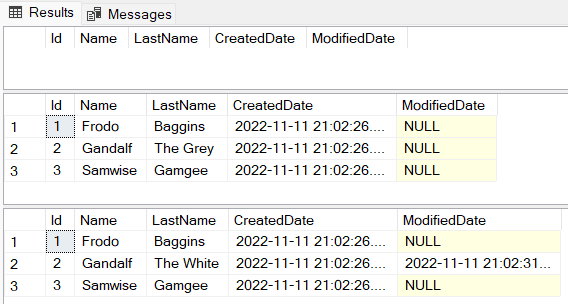
- As expected, in the first
SELECTnothing was returned. - On the second
SELECT, which was executed after theMergePersonbe executed three times, the recordsFrodo,GandalfandSamwisewas returned. - On the third
SELECT, after the last execution of theMergePersonprocedure,Gandalf The Greywas updated toGandalf The White. Note that it kept the sameCreateDatebut included the date and time that the record was updated (ModifiedDatecolumn).
Merge Stored Procedure for Upsert a list of Persons
Now think of a scenario where instead of upserting a single record, you will receive a list of persons, and the procedure should take care of multiple records instead of a single one.
In order to receive a list of persons as a parameter, we need to have a Table-Valued parameter, for that we need to create a User-Defined Table Type (if you are not familiar with Table-Valued parameters, I recommend reading a previous article I wrote about this topic, you can read it by clicking here). This is the User-Defined Type Table that will be used as a parameter to the procedure:
CREATE TYPE PersonType AS TABLE (
	Id INT NOT NULL,
	Name NVARCHAR(100) NULL,
	LastName NVARCHAR(255) NULL,
	PRIMARY KEY(Id)
);
This procedure will have the following behavior: it will receive as a parameter a variable with the type PersonType(which is something similar to a list of persons), then it will execute the MERGE statement, on which it will upsert the records into the Persons table. It will have similar behaviour as the previous procedure, but now instead of considering a single record, it will consider a list of records. This is the procedure behavior:
- If the record with the specified primary key does not exist in the table, it will insert it.
- If the primary key already exists, it will update the record
This is the MergePersonsUpsert procedure:
CREATE PROCEDURE dbo.MergePersonsUpsert (
		@Persons PersonType READONLY
	)
AS
BEGIN

	MERGE Persons as target
		USING (
			SELECT
				Id,
				Name,
				LastName
			FROM @Persons
			) AS source
		ON target.Id = source.Id

	WHEN NOT MATCHED THEN
	INSERT (
		Id,
		Name,
		LastName
	)
	VALUES
	(
		source.Id,
		source.Name,
		source.LastName
	)

	WHEN MATCHED THEN
		UPDATE SET
			Name = source.Name,
			LastName = source.LastName,
			ModifiedDate = GETUTCDATE()
	;

END- On line 2, there is the parameter
@Personsof typePersonType. - On line 7, the
MERGEstatement starts, and it will use the values from the parameter@Personsassource, and thePersonstable astarget. - On line 17 up to 28, it will check if the
sourcedo not match thetarget, it willINSERTthe record. - On line 30 up to 34, it will check if the
Sourcedo match theTarget, it willUPDATEthe record.
Let’s now test this procedure:
BEGIN TRANSACTION

	SELECT * FROM Persons;

	INSERT INTO Persons (Id, Name, LastName)
	VALUES (1, 'Frodo', 'Baggins'),
		   (2, 'Gandalf', 'The Grey'),
		   (3, 'Samwise', 'Gamgee');

	SELECT * FROM Persons;

	WAITFOR DELAY '00:00:05';

	DECLARE @Persons PersonType;

	INSERT INTO @Persons
	SELECT 4, 'Eddard ', 'Stark'
	UNION ALL
	SELECT 2, 'Gandalf', 'The White'
	UNION ALL
	SELECT 5, 'Daenerys', 'Targaryen';

	EXEC MergePersonsUpsert @Persons;

	SELECT * FROM Persons;

ROLLBACK- On line 3, a
SELECTis executed to query the records fromPersonstable. - On lines 5 up to 8, there is a manual
INSERToperation to add the following records into thePersonstable:Frodo Baggins,Gandalf The GreyandSamwise Gamgee. - On line 10, a new
SELECTto query the records fromPersonstable is executed. - On line 12, there is a delay instruction, to wait for 5 seconds before running the next scripts, this is done in order to see a different time in the
ModifiedDate, otherwise, the time would be the same as theCreatedDate. - On line 14, the variable
@Personsof typePersonTypeis declared. - On lines 16 up to 21, three records are added into the
@Personsvariable:Eddard Stark,Gandalf the WhiteandDaenerys Targaryen. - On line 13, the
MergePersonsUpsertprocedure is executed, with the parameter@Persons. - On line 25, a new
SELECTto query thePersonstable is executed.
This is the result:
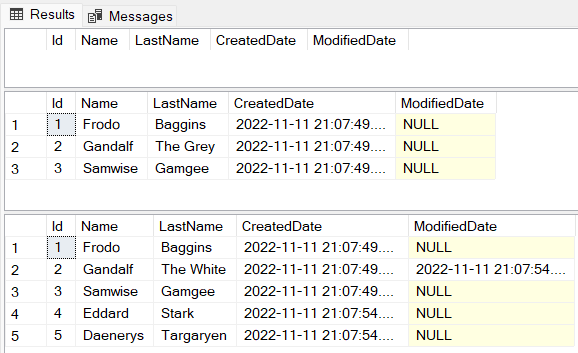
- As expected, nothing was returned in the first
SELECT. - In the second
SELECT, after the manualINSERTscript be executed, the recordsFrodo,GandalfandSamwisewere returned. - The third
SELECT, after the procedureMergePersonsUpsertbe executed, it was returned the recordsFrodo Baggins,Gandalf the White,Samwise Gamgge,Eddard StarkandDaenerys Targaryen.
This is what happened during the execution of the MergePersonsUpsert procedure:
Frodo BagginsandSamwise Gamggealready existed in the database, so nothing was changed for these two records. You can confirm that by checking the values in theCreatedDatecolumn (which has the time of the creation of the records) and theModifiedDatecolumn is null — which means that the records were not updated).- The record for
Gandalf The Greywas updated toGandalf the White, because the Primary Key Id 2 already existed in the database and also exists in the@Personsvariable. You can confirm that by checking the values in theCreatedDatecolumn andModifiedDatecolumns, it kept the sameCreateDatebut included the date and time that the record was updated (ModifiedDatecolumn). - And the records
Eddard StarkandDaenerys Targaryenwere added to thePersonstable, because the Primary Key Ids 4 and 5 exist in the@Personsvariable and did not exist in thePersonstable.
Merge Stored Procedure for Upsert and Delete a list of Persons
Now let’s include a new requirement for the new procedure: every time the procedure is executed, it’s not only necessary to upsert the records but also delete the records that are in the database but are not in the list of persons that was received as a parameter.
Think of a scenario where your application receives some data from some other application, and you need to override all the data in your database every time the procedure is executed. Perhaps you are thinking that instead of implementing a merge for that, we could only delete all the records and insert them again, this would work of course, but the indexes of the table will be messed up, so to avoid this situation, let’s use the merge statement.
The procedure will receive as a parameter a variable of type PersonType(think of that as something similar to a list of persons), then it will execute the MERGE statement, on which it will upsert or delete records into the Persons table. It will have the following behavior:
- If the record from the
@Personsparameter contains a primary key that does not exist in the table in the database, it will insert the record. - If the record from the
@Personsparameter contains a primary key that already exists in the table in the database, it will update the record. - If a record exists in the database, but does not exist in the
@Personsvariable, it will delete the existent record in the database.
For this example, I’m going to make use of a temporary table inside the procedure. This is not mandatory, but in case you know that you will receive a big amount of data, this is something that you should consider using because it will improve the performance of the procedure.
This is the MergePersonsWithDelete procedure:
CREATE PROCEDURE dbo.MergePersonsWithDelete (
		@Persons PersonType READONLY
	)
AS
BEGIN

	 IF OBJECT_ID('#PersonsTemp') IS NOT NULL
		DROP TABLE #PersonsTemp

	 CREATE TABLE #PersonsTemp
	 (
		Id INT NOT NULL,
		Name NVARCHAR(100) NULL,
		LastName NVARCHAR(255) NULL,
		PRIMARY KEY (Id)
	 );

	INSERT INTO #PersonsTemp
	SELECT *
	FROM @Persons

	MERGE Persons as target
		USING (
			SELECT
				Id,
				Name,
				LastName
			FROM #PersonsTemp
			) AS source
		ON target.Id = source.Id

	WHEN NOT MATCHED THEN
	INSERT (
		Id,
		Name,
		LastName
	)
	VALUES
	(
		source.Id,
		source.Name,
		source.LastName
	)

	WHEN MATCHED THEN
		UPDATE SET
			Name = source.Name,
			LastName = source.LastName,
			ModifiedDate = GETUTCDATE()

	WHEN NOT MATCHED BY SOURCE
	THEN
		DELETE
	;

END- On line 2, there is the parameter
@Personsof typePersonType. - On lines 7 and 8, there is a validation to drop the temporary table (“
PersonsTemp”) when it is not null. - On lines 10 up to 16, the temporary table
#PersonsTempis created. - On lines 18 up to 20, the values from the parameter
@Personsare inserted into the temporary table#PersonsTemp. - On lines 22 up to 30, the
MERGEstatement starts, and it will use the temporary table#PersonsTempassource, and thePersonstable astarget. - On lines 32 up to 43, it will check if the
sourcedo not match thetarget, it willINSERTthe record. - On lines 45 up to 49, it will check if the
sourcedo match thetarget, it willUPDATEthe record. - On lines 51 up to 53, it will check if the
targetdo not match thesource, which means, if the person exists in the database, but does not exist in the#PersonsTemptable (which values come from the@Personsvariable from the parameter), it will delete the record in the database.
[Extra] It’s also possible to include conditions in the merge statement. For instance, using the example of this procedure, let’s say that we never want to delete the record with the primary key 1, even when this record exists in the database but do not exist in the list of persons that was sent to the procedure. In this case, before the DELETE operation, it’s possible to include the “AND target.Id <> 1”:
WHEN NOT MATCHED BY SOURCE AND target.Id <> 1
 THEN
  DELETE
 ;
This means that when target do not match the source AND the target Id is different than 1, then it will delete the record, otherwise will not delete it. We will not use this in this procedure, since we want to delete everything, but it’s good to know that it’s possible to do it when necessary.
Let’s now test this procedure:
BEGIN TRANSACTION

	SELECT * FROM Persons;

	INSERT INTO Persons (Id, Name, LastName)
	VALUES (1, 'Frodo', 'Baggins'),
		   (2, 'Gandalf', 'The Grey'),
		   (3, 'Samwise', 'Gamgee');

	SELECT * FROM Persons;

	WAITFOR DELAY '00:00:05';

	DECLARE @Persons PersonType;

	INSERT INTO @Persons
	SELECT 4, 'Eddard ', 'Stark'
	UNION ALL
	SELECT 2, 'Gandalf', 'The White'
	UNION ALL
	SELECT 5, 'Daenerys', 'Targaryen';

	EXEC MergePersonsWithDelete @Persons;

	SELECT * FROM Persons;

ROLLBACK- On line 3, the records for persons (before running the merge) will be returned.
- On line 5, there is an
INSERTto add some data into thePersonsfolder. It will create three persons:Frodo Baggins,Gandalf The GreyandSamwise Gamgee. - On line 10, a new
SELECTto query the persons is executed. - On line 12, there is a delay instruction, to wait for 5 seconds before running the next scripts, this is done in order to see a different time in the
ModifiedDate, otherwise the time would be the same as theCreatedDate. - On line 14, the variable
@Personsof typePersonTypeis declared. - On lines 16 up to 21, there is the
INSERTto the table type variable. It will be added three values:Eddard Stark,Gandalf the WhiteandDaenerys Targaryen. - On line 24, the merge script is executed.
- On line 26, a new
SELECTto query the persons is executed.
This is the result:
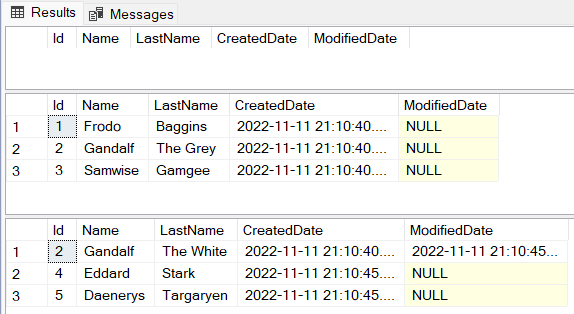
- As expected, nothing was returned in the first
SELECT. - In the second
SELECT, after the manualINSERTbe executed, the recordsFrodo,GandalfandSamwisewere returned. - The third
SELECT, after the procedureMergePersonsWithDeletebe executed, it was returned the recordsGandalf the White,Eddard StartkandDaenerys Targaryen.
This is what happened during the execution of the MergePersonsWithDelete procedure:
FrodoandSamwisewere deleted from the database, because the Primary Keys Id 1 and Id 3 were not on the@Personsvariable that was sent to the procedure- The record for
Gandalf The Greywas updated toGandalf the White, because the Primary Key Id 2 already existed in the database and it also existed in the@Personsvariable (note that similar to the previous procedure, it kept the sameCreateDatebut included the date and time that the record was updated (ModifiedDatecolumn). - And the records
Eddard StarkandDaenerys Targaryenwere added to thePersonstable, because the Primary Key Ids 4 and 5 exist in the@Personsvariable and did not exist in thePersonstable in the database.
Conclusion
The MERGE statement is useful when you need to have a procedure that can handle insert and update (upsert) or delete operations in the same transaction, without creating separate procedures for each operation. It’s possible to use MERGE for merging a single record, or for merging a list of records.
This is the link for the repository with the scripts in GitHub: https://github.com/henriquesd/SQLExamples
If you like this solution, I kindly ask you to give a ⭐️ in the repository.
Thanks for reading!
References