When your application depends on external services, occasional delays or outages are unavoidable. If a dependency becomes slow or unavailable, your application needs to handle it without hurting the user experience. Waiting too long for a response wastes resources and leads to poor responsiveness for users. On the other hand, immediately returning errors (even when a reasonable fallback exists), can also have a negative impact. To handle these situations more effectively, you can define clear time limits for operations and provide alternative responses when things go wrong.
In this article, I demonstrate how to use the Timeout and Fallback strategies to set time limits on operations and return default responses when requests fail. For that, I'm using practical examples using a .NET 10 Web API and Microsoft’s HTTP resilience package, which is powered by Polly.
This is the third article of the series "Building a Resilient .NET Web API". Below you can find the previous articles of this series:
- Part 1 - Introduction to Resilience: https://henriquesd.com/articles/building-a-resilient-net-web-api-part-1
- Part 2 - Retry Strategies: https://henriquesd.com/articles/building-a-resilient-net-web-api-part-2
- Part 3 - Circuit Breaker: https://henriquesd.com/articles/building-a-resilient-net-web-api-part-3
Timeout Strategy
The Timeout strategy sets a maximum time an operation can take. If the downstream service does not respond within the configured time limit, Polly cancels the request and throws a TimeoutRejectedException. This stops your app from waiting indefinitely for a response that may never come back.
The configuration property to set it is:
Timeout: on which you set the maximum duration to wait for the operation to complete before cancelling it.
Behind the scenes, Polly uses CancellationToken to cancel the operation when the timeout is reached. The HttpClient receives the cancellation signal and aborts the HTTP request.
Real-world use cases for Timeout Strategy
Let’s look at a real-world example: a Checkout flow that calls an external payment provider. If the payment provider becomes slow and takes too long to respond, keeping the request open can increase response times for users, tie up threads and connections, and create uncertainty about the payment state. By applying a timeout strategy, the request can be aborted after a defined period, allowing the application to respond quickly (either by informing the user or triggering a fallback) rather than leaving them waiting indefinitely.
Consider also a Microservices architecture, in which services often communicate with each other over HTTP. If one service becomes slow, it can cascade delays across multiple services, leave threads blocked while waiting for responses, and reduce overall system throughput. A timeout strategy limits how long a service needs to wait for another, helping to contain failures and preventing the entire system from becoming slow.
The UnreliableWeatherApi
To show the Timeout strategy in action, let’s add a new endpoint to the UnreliableWeatherApi, which is an API that simulates specific failure scenarios. The GetDelayed method simulates a slow service by introducing an artificial delay before returning a response:
[HttpGet("delayed")]
public async Task<IActionResult> GetDelayed()
{
    var delaySeconds = Random.Shared.Next(5, 11);

    await Task.Delay(TimeSpan.FromSeconds(delaySeconds));

    return Ok(new { Temperature = 15, Summary = "Rainy" });
}- On line 4,
Random.Shared.Next(5, 11)generates a random delay between 5 and 10 seconds, simulating a service that is responding but taking too long. - On line 6,
Task.Delaypauses the request handler for the generated duration. - On line 8, after the delay, the endpoint returns a successful response with weather data.
The GetDelayed method simulates a slow service with a 5–10 second delay. This ensures the 3-second timeout in ResilientApi will always trigger, making it perfect to test our strategy.
Configuring the Timeout Strategy
Following the same extension method pattern from the previous articles, let's add the timeout HttpClient registration to the HttpClientResilienceExtensions class:
public static IServiceCollection AddTimeoutClient(this IServiceCollection services, Uri baseAddress)
{
    services.AddHttpClient("UnreliableWeatherApi-Timeout", client =>
    {
        client.BaseAddress = baseAddress;
    })
    .AddResilienceHandler("timeout", pipelineBuilder =>
    {
        pipelineBuilder.AddTimeout(new TimeoutStrategyOptions
        {
            Timeout = TimeSpan.FromSeconds(3),
            OnTimeout = static args =>
            {
                Console.WriteLine($"Request timed out after {args.Timeout.TotalSeconds:F1}s");
                return default;
            }
        });
    });

    return services;
}- On line 9,
AddTimeoutusesTimeoutStrategyOptions. Unlike retry or circuit breaker strategies, the timeout strategy is generic because it just cancels the operation after the set time, no matter what kind of request it is. - On line 11,
Timeoutis set to 3 seconds. If the downstream service does not respond within 3 seconds, Polly cancels the request. - On lines 12 to 16, the
OnTimeoutcallback logs whenever a timeout happens. Theargs.Timeouttells you how long the operation waited before cancelling (the configured timeout duration).
When the timeout triggers, Polly throws a TimeoutRejectedException. This is different from the standard TaskCanceledException that HttpClient throws when a CancellationToken is cancelled; Polly wraps it in its own exception type so you can distinguish between a Polly timeout and other cancellation scenarios.
The Timeout Controller
Now let's create the GetWithTimeout method on the TimeoutController that calls the UnreliableWeatherApi's delayed endpoint using the timeout client:
[HttpGet("weather")]
public async Task<IActionResult> GetWithTimeout()
{
    try
    {
        var client = _httpClientFactory.CreateClient("UnreliableWeatherApi-Timeout");
        var response = await client.GetAsync("/api/weather/delayed");

        if (response.IsSuccessStatusCode)
        {
            var content = await response.Content.ReadAsStringAsync();
            return Content(content, "application/json");
        }

        return StatusCode((int)response.StatusCode);
    }
    catch (TimeoutRejectedException)
    {
        return StatusCode(504, new { Message = "Request timed out. The downstream service took too long to respond." });
    }
}- The method is wrapped in a
tryblock. This is necessary because, unlike the retry strategy, which always returns anHttpResponseMessage, the timeout strategy throws aTimeoutRejectedExceptionwhen the configured timeout is exceeded. - On lines 6 and 7, the named client ("UnreliableWeatherApi-Timeout") with the timeout resilience handler attached is created and the request is sent to the
/api/weather/delayedendpoint, which has a 5-10 second delay. Since the timeout is configured to 3 seconds, this request will always time out. - On lines 17 to 20, the
TimeoutRejectedExceptionis caught, and the controller returns a 504 Gateway Timeout status code with an explanatory message.
Note that the exception handling pattern here is similar to the circuit breaker controller from the previous article. In both cases, the Polly strategy throws an exception instead of returning an HttpResponseMessage.
- The Circuit Breaker throws
BrokenCircuitExceptionwhen the circuit is open - The Timeout throws
TimeoutRejectedExceptionwhen the operation exceeds the configured time limit.
Fallback Strategy
The Fallback strategy provides a default value or executes alternative logic when an operation fails. Instead of returning an error to the caller, the fallback returns a predefined response, allowing the application to continue operating gracefully. This is useful when you have cached data, default values, or alternative data sources that can act as a reasonable substitute when the primary service is unavailable.
Real-world use cases for Fallback Strategy
Consider a scenario where your application needs to check the status of a payment through an external provider. If that provider is temporarily unavailable, returning an error may confuse the user or interrupt the flow. With a fallback strategy in place, your application can return a safe default response, such as “Payment status temporarily unavailable, please check again later”, or rely on the last known status if available. This keeps the experience controlled and avoids exposing transient failures directly to the user.
Another example, think of E-commerce platforms, which often rely on external services to provide product recommendations or dynamic content. If the recommendation service fails, the page may break or feel incomplete, and users might see errors instead of meaningful content. By applying a fallback strategy, the application can return a static list of popular products, cached recommendations, or a simplified experience without personalisation. This ensures the page still loads properly and remains useful to the user, even when the underlying service is unavailable.
Configuring the Fallback Strategy
For the Fallback Strategy configuration, we can use the following configuration:
ShouldHandle: Defines when the fallback should be triggered. For example, on specific exceptions, certain HTTP status codes, or any custom condition that you define.FallbackAction: Specifies what to do when the main operation fails. It returns the fallback result inside of anOutcome<T>.OnFallback: An optional callback that is invoked when the fallback is triggered. This is typically used for logging or monitoring.
Let's add the fallback HttpClient registration:
public static IServiceCollection AddFallbackClient(this IServiceCollection services, Uri baseAddress)
{
    services.AddHttpClient("UnreliableWeatherApi-Fallback", client =>
    {
        client.BaseAddress = baseAddress;
    })
    .AddResilienceHandler("fallback", pipelineBuilder =>
    {
        pipelineBuilder.AddFallback(new FallbackStrategyOptions<HttpResponseMessage>
        {
            ShouldHandle = static args => ValueTask.FromResult(
                args.Outcome.Exception is not null ||
                args.Outcome.Result?.IsSuccessStatusCode == false),
            FallbackAction = static args =>
            {
                var response = new HttpResponseMessage(System.Net.HttpStatusCode.OK)
                {
                    Content = JsonContent.Create(new { Temperature = 0, Summary = "N/A (fallback)" })
                };
                return Outcome.FromResultAsValueTask(response);
            },
            OnFallback = static args =>
            {
                Console.WriteLine($"Fallback triggered. Reason: {args.Outcome.Exception?.Message ?? args.Outcome.Result?.StatusCode.ToString()}");
                return default;
            }
        });
    });

    return services;
}- On line 9, we call
AddFallbackwithFallbackStrategyOptions<HttpResponseMessage>. Since there is no HTTP-specific fallback class, we can use the generic one (this tells Polly to return anHttpResponseMessage). - On lines 11 to 13, we have the
ShouldHandle, which triggers the fallback on exceptions or failed HTTP responses. - On lines 14 to 21, we have the
FallbackAction, which returns a 200 OK response with default weather data in JSON. - On line 20, the
Outcome.FromResultAsValueTaskmethod wraps the response in anOutcome<HttpResponseMessage>, which is the return type that Polly expects from the fallback action. - On lines 22 to 26, we have the
OnFallback, which logs when the fallback is triggered and why (either the exception message or the HTTP status code).
Note that the ShouldHandle pattern here is different from HttpRetryStrategyOptions and HttpCircuitBreakerStrategyOptions, which come pre-configured to handle HTTP 5xx errors. With the generic FallbackStrategyOptions<HttpResponseMessage>, you must define ShouldHandle explicitly.
The Fallback Controller
Now let's create the GetWithFallback method on the FallbackController:
[HttpGet("weather")]
public async Task<IActionResult> GetWithFallback()
{
    var client = _httpClientFactory.CreateClient("UnreliableWeatherApi-Fallback");
    var response = await client.GetAsync("/api/weather");

    var content = await response.Content.ReadAsStringAsync();
    return Content(content, "application/json");
}- On lines 4 and 5, the named client ("UnreliableWeatherApi-Fallback") with the fallback handler attached is created and the request is sent to the
/api/weatherendpoint, which fails approximately 67% of the time with a 500 status code. - On lines 7 and 8, it reads and returns the response content. Note that there is no
try/catchblock and no status code check because the fallback ensures the response is always successful, either the real response (if the API succeeds) or the fallback with default weather data.
This is an important difference from the timeout and circuit breaker strategies. With those strategies, you need to handle exceptions explicitly. With the fallback strategy, the pipeline absorbs the failure and returns a valid response, making the controller code simpler.
Combining Timeout and Fallback
The real power of Polly becomes apparent when you combine multiple strategies into a single pipeline. A common pattern is to combine Timeout with Fallback: if the downstream service does not respond within the time limit, instead of returning a timeout error, return default data.
The order in which strategies are added to the pipeline matters. Strategies added first are the outermost (they wrap the strategies added after them). In our case:
- Fallback is added first (outermost): is outermost to catch any exception from the inner strategies, including timeouts, network errors, or HTTP failures, ensuring a graceful response.
- Timeout is added second (innermost): it directly wraps the HTTP call
Note: The fallback strategy can catch exceptions thrown by the timeout strategy (e.g., TimeoutRejectedException). This ensures that even if a request times out, the fallback will provide a default response, so the controller always receives a valid result. Sometimes this interaction can be overlooked, but this is what makes the combination powerful.
When the HTTP call exceeds the timeout:
- The Timeout strategy cancels the request and throws a
TimeoutRejectedException - The Fallback strategy catches the exception and returns the default weather data
In the diagram below, you can see the flow:
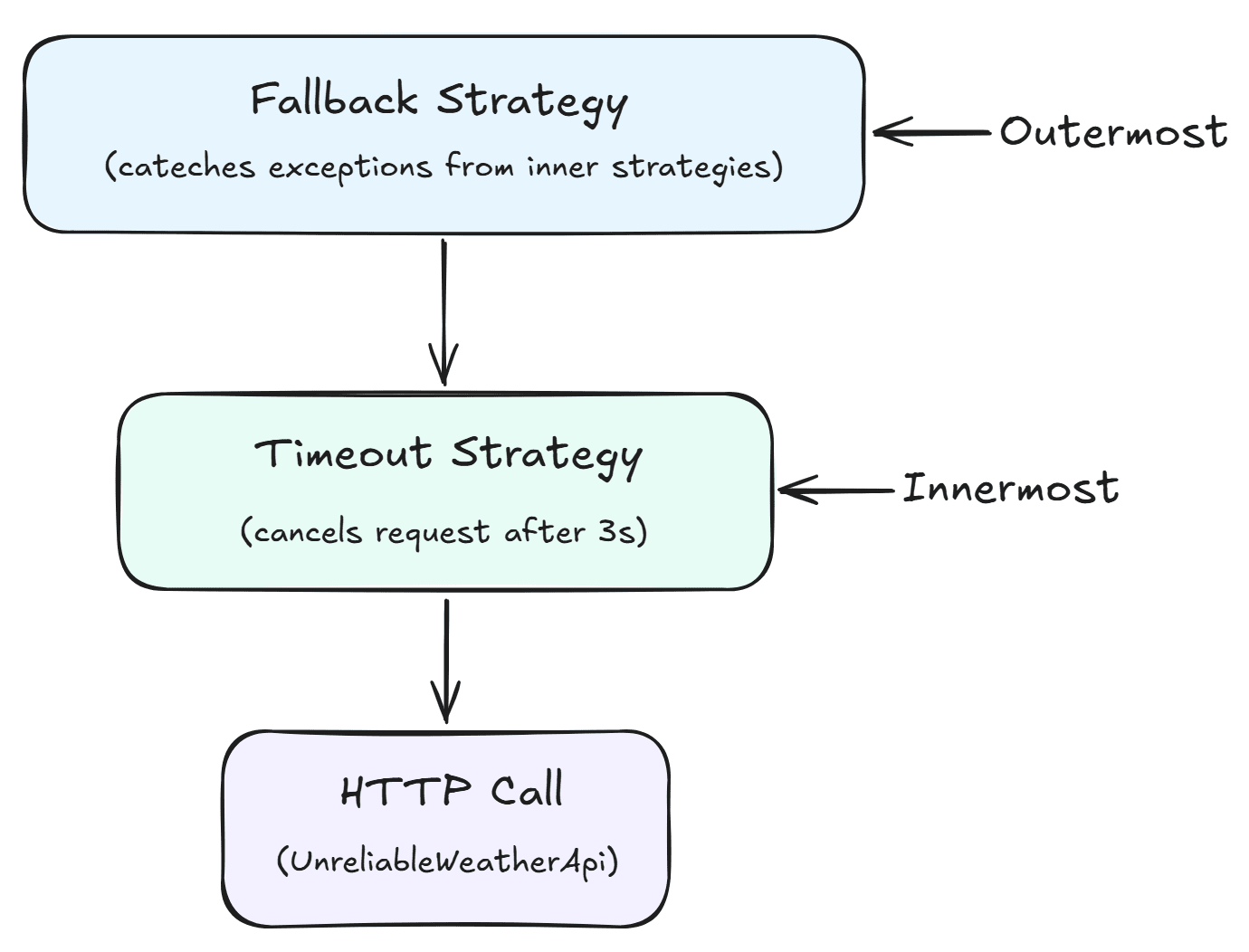
- The Timeout strategy wraps the HTTP call. If the downstream service takes too long, it cancels the request and throws a TimeoutRejectedException.
- The Fallback strategy wraps the Timeout strategy. If any exception occurs (timeout, HTTP error, network failure), the fallback triggers and returns default data. Note that the fallback not only handles HTTP errors but also exceptions from the timeout strategy.
- This order ensures the application never hangs (timeout) and always returns a valid response (fallback).
Configuring the combined strategy
Let's add the combined HttpClient registration:
public static IServiceCollection AddTimeoutFallbackClient(this IServiceCollection services, Uri baseAddress)
{
    services.AddHttpClient("UnreliableWeatherApi-TimeoutFallback", client =>
    {
        client.BaseAddress = baseAddress;
    })
    .AddResilienceHandler("timeout-fallback", pipelineBuilder =>
    {
        pipelineBuilder.AddFallback(new FallbackStrategyOptions<HttpResponseMessage>
        {
            ShouldHandle = static args => ValueTask.FromResult(
                args.Outcome.Exception is not null ||
                args.Outcome.Result?.IsSuccessStatusCode == false),
            FallbackAction = static args =>
            {
                var response = new HttpResponseMessage(System.Net.HttpStatusCode.OK)
                {
                    Content = JsonContent.Create(new { Temperature = 0, Summary = "N/A (fallback)" })
                };
                return Outcome.FromResultAsValueTask(response);
            },
            OnFallback = static args =>
            {
                Console.WriteLine($"Fallback triggered. Reason: {args.Outcome.Exception?.Message ?? args.Outcome.Result?.StatusCode.ToString()}");
                return default;
            }
        });

        pipelineBuilder.AddTimeout(new TimeoutStrategyOptions
        {
            Timeout = TimeSpan.FromSeconds(3),
            OnTimeout = static args =>
            {
                Console.WriteLine($"Request timed out after {args.Timeout.TotalSeconds:F1}s");
                return default;
            }
        });
    });

    return services;
}- On line 9,
AddFallbackis added first, making it the outermost strategy. - On line 29,
AddTimeoutis added second, making it the innermost strategy. This means the timeout directly wraps the HTTP call, and the fallback wraps the timeout. - The
ShouldHandledelegate in the fallback now catches bothTimeoutRejectedException(through theargs.Outcome.Exception is not nullcheck) and HTTP error responses. This means the fallback will trigger whether the request times out or returns an error status code.
The Timeout Fallback Controller
This is the GetWithTimeoutFallback method on the TimeoutFallbackController for the combined pipeline:
[HttpGet("weather")]
public async Task<IActionResult> GetWithTimeoutFallback()
{
    var client = _httpClientFactory.CreateClient("UnreliableWeatherApi-TimeoutFallback");
    var response = await client.GetAsync("/api/weather/delayed");

    var content = await response.Content.ReadAsStringAsync();
    return Content(content, "application/json");
}- On lines 19 and 20, the named client ("UnreliableWeatherApi-TimeoutFallback") that has both fallback and timeout strategies attached is created and the request is sent to the
/api/weather/delayedendpoint, which has a 5-10 second delay. - Similar to the fallback controller, there is no
try/catchblock. When the timeout triggers (after 3 seconds), the fallback catches theTimeoutRejectedExceptionand returns the default weather data. The controller always receives a successful response.
Registering the New Clients in Program.cs
With the extension methods defined, registering the new clients in Program.cs requires three additional lines:
using HttpResilienceDemo.ResilientApi.Extensions;

var builder = WebApplication.CreateBuilder(args);

builder.Services.AddControllers();

var unreliableWeatherApiBaseAddress = new Uri(builder.Configuration["UnreliableWeatherApi:BaseAddress"]!);

builder.Services
    .AddConstantRetryClient(unreliableWeatherApiBaseAddress)
    .AddLinearRetryClient(unreliableWeatherApiBaseAddress)
    .AddExponentialRetryClient(unreliableWeatherApiBaseAddress)
    .AddSelectiveRetryClient(unreliableWeatherApiBaseAddress)
    .AddRetryAfterClient(unreliableWeatherApiBaseAddress)
    .AddCircuitBreakerClient(unreliableWeatherApiBaseAddress)
    .AddTimeoutClient(unreliableWeatherApiBaseAddress)
    .AddFallbackClient(unreliableWeatherApiBaseAddress)
    .AddTimeoutFallbackClient(unreliableWeatherApiBaseAddress);

var app = builder.Build();

app.UseHttpsRedirection();

app.MapControllers();

app.Run();- On lines 16 to 18, the three new resilient
HttpClientregistrations are chained to the existing ones:AddTimeoutClient,AddFallbackClient, andAddTimeoutFallbackClient.
Running the Demo
To run the demo, start both applications. First, start the UnreliableWeatherApi:
dotnet run --project src/HttpResilienceDemo.UnreliableWeatherApiThen, in a separate terminal, start the ResilientApi:
dotnet run --project src/HttpResilienceDemo.ResilientApiNow you can test each strategy:
# Timeout (will always time out since the delay is 5-10s and timeout is 3s)
curl https://localhost:5002/api/timeout/weather

# Fallback (returns real data ~33% of the time, fallback data ~67% of the time)
curl https://localhost:5002/api/fallback/weather

# Combined Timeout + Fallback (always returns fallback data due to timeout)
curl https://localhost:5002/api/timeout-fallback/weather
Watch the ResilientApi console output to observe the strategy behavior:
- When testing the timeout endpoint, you will see the timeout trigger after 3 seconds, followed by a 504 Gateway Timeout response. The console will log:
Request timed out after 3.0s- When testing the fallback endpoint, you will see one of two outcomes. When the UnreliableWeatherApi succeeds (approximately 33% of the time), you receive the actual weather data
{"temperature":25,"summary":"Sunny"}. When the UnreliableWeatherApi fails (approximately 67% of the time), the fallback triggers and you receive the default data{"temperature":0,"summary":"N/A (fallback)"}. The console will log:
Fallback triggered. Reason: InternalServerError- When testing the combined timeout-fallback endpoint, you will see the timeout trigger first, followed by the fallback. The response will always contain the default weather data because the delayed endpoint always exceeds the 3-second timeout. The console will log:
Request timed out after 3.0s
Fallback triggered. Reason: The operation was canceled.
Note that the fallback reason shows "The operation was canceled.", this is the message from the TimeoutRejectedException that Polly throws when the timeout is reached.
Conclusion
In this article, I demonstrated how to use the Timeout and Fallback strategies with the Microsoft.Extensions.Http.Resilience package, powered by Polly v8.
The Timeout strategy prevents your application from waiting indefinitely for a slow downstream service by cancelling the request after a configured duration, while the Fallback strategy ensures a default response when failures occur. As demonstrated, you can also combine these two strategies to keep your application responsive and resilient.
In the next article, I will cover the Rate Limiter and Hedging strategies, and show how to combine multiple strategies into a comprehensive resilience pipeline.
This is the link for the project in GitHub: https://github.com/henriquesd/HttpResilienceDemo
If you like this demo, I kindly ask you to give a ⭐ in the repository.
Thanks for reading!
References