Beyond Retry, Circuit Breaker, Timeout, and Fallback strategies, there are additional resilience strategies for controlling concurrency, reducing latency, and building robust resilience pipelines. In this article, I demonstrate the Rate Limiter and Hedging strategies and show how to combine multiple strategies into a single pipeline using a .NET 10 Web API and Microsoft’s HTTP resilience package powered by Polly.
This is the fifth article of the series "Building a Resilient .NET Web API". Below you can find the previous articles of this series:
- Part 1 - Introduction to Resilience: https://henriquesd.com/articles/building-a-resilient-net-web-api-part-1
- Part 2 - Retry Strategies: https://henriquesd.com/articles/building-a-resilient-net-web-api-part-2
- Part 3 - Circuit Breaker: https://henriquesd.com/articles/building-a-resilient-net-web-api-part-3
- Part 4 - Timeout and Fallback: https://henriquesd.com/articles/building-a-resilient-net-web-api-part-4
Rate Limiter Strategy
The Rate Limiter strategy controls concurrency to prevent your application from overloading a downstream service. If you send too many requests at once, the downstream service may become unresponsive or start returning errors. This strategy enforces a maximum number of concurrent requests and optionally queues excess requests instead of rejecting them immediately.
This concept was already present in Polly v7 with the name of Bulkhead Isolation. In Polly v8, the Rate Limiter uses System.Threading.RateLimiting under the hood, which is the standard .NET rate limiting API.
Real-world use cases for Rate Limiter
The Rate Limiter strategy is particularly useful in scenarios where your application interacts with services that have limited capacity or enforce strict usage limits.
For example, a Payment processing system that communicates with a third-party gateway can use a rate limiter to prevent sending too many payment requests at once, avoiding timeouts or rejected transactions.
Similarly, an e-commerce platform calling an external inventory API can limit concurrent requests to ensure the service remains responsive, preventing stock availability checks from overwhelming the system.
Another example is applications that consume public APIs, such as social media feeds or weather data, can use a rate limiter to respect provider rate limits, queuing or delaying excess requests rather than being blocked or throttled unexpectedly.
In all these cases, the rate limiter protects both your application and downstream services, ensuring stability under high load.
The UnreliableWeatherApi
To demonstrate the Rate Limiter strategy, let's add a new endpoint to the UnreliableWeatherApi that simulates a service with limited capacity. This is the new limited endpoint added to the WeatherController:
[HttpGet("limited")]
public async Task<IActionResult> GetLimited()
{
    await Task.Delay(TimeSpan.FromSeconds(2));

    return Ok(new { Temperature = 21, Summary = "Clear" });
}- The
GetLimitedmethod simulates a service with limited capacity. It adds a 2-second delay before responding with success. This way, we can simulate that concurrent requests will overlap, and when multiple requests arrive at the same time, they will all be in-flight simultaneously for those 2 seconds. - On line 4, we use
Task.Delayto hold the request for 2 seconds. This means that if 5 requests arrive at the same time, all 5 will be in-flight concurrently for at least 2 seconds, which allows the rate limiter to enforce its concurrency limit.
Configuring the Rate Limiter Strategy
To configure the Rate Limiter Strategy, we can use the following properties:
PermitLimit: The maximum number of concurrent requests allowed. Requests beyond this limit are either queued or rejected.QueueLimit: How many extra requests can wait in a queue. When both the permit limit and the queue are full, additional requests are rejected immediately with aRateLimiterRejectedException.
Following the same extension method pattern from the previous articles, let's add the rate limiter HttpClient registration to the HttpClientResilienceExtensions class:
public static IServiceCollection AddRateLimiterClient(this IServiceCollection services, Uri baseAddress)
{
    services.AddHttpClient("UnreliableWeatherApi-RateLimiter", client =>
    {
        client.BaseAddress = baseAddress;
    })
    .AddResilienceHandler("rate-limiter", pipelineBuilder =>
    {
        pipelineBuilder.AddConcurrencyLimiter(new ConcurrencyLimiterOptions
        {
            PermitLimit = 2,
            QueueLimit = 2
        });
    });

    return services;
}- On line 9,
AddConcurrencyLimiteruses .NET’sConcurrencyLimiterOptionsto configure limits. - On line 11,
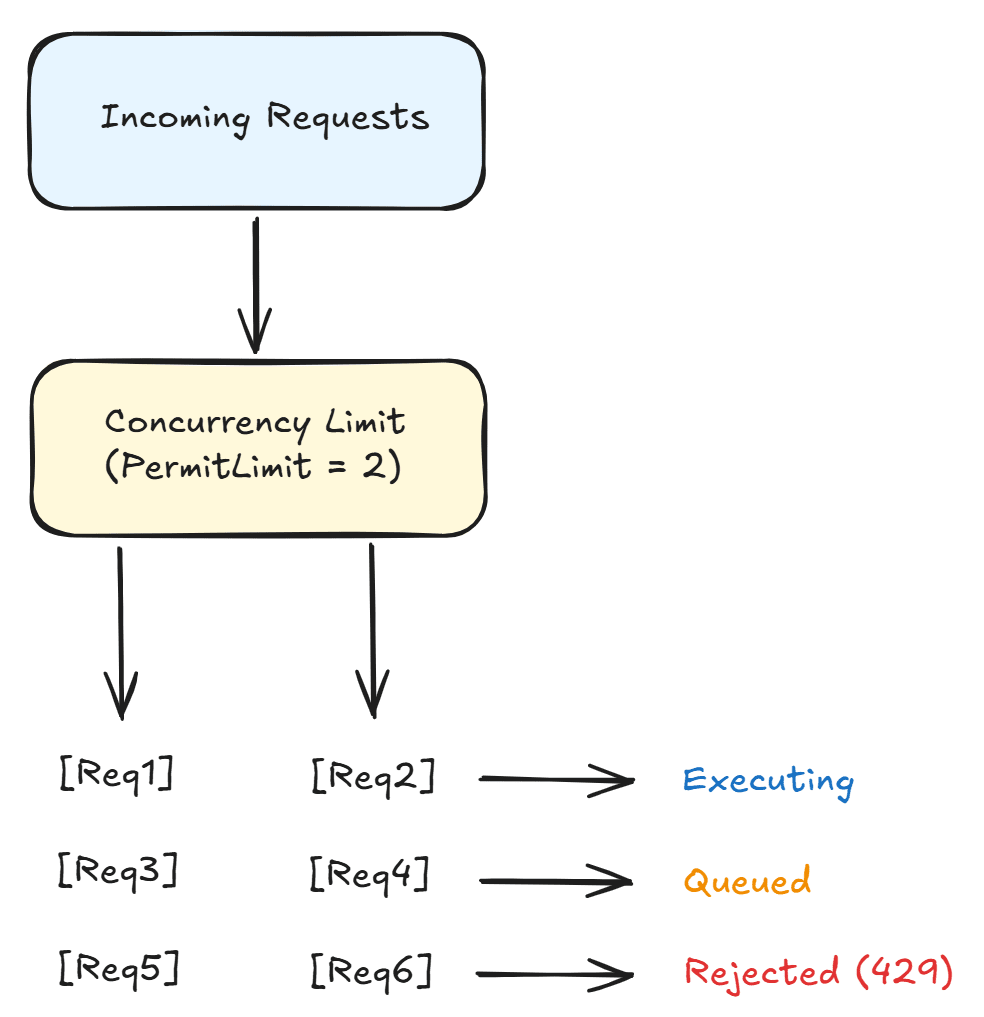
PermitLimitis set to 2, meaning only 2 requests can be executed concurrently. If a third request arrives while 2 are already in-flight, it will be placed in the queue. - On line 12,
QueueLimitis set to 2, meaning up to 2 additional requests can wait in the queue; further requests are rejected.
This setup handles 4 requests at a time: 2 running and 2 queued. The 5th concurrent request and beyond will be rejected.
The image below illustrates a Concurrency Limit with Queuing:
The Rate Limiter Controller
Now let's create the GetWithRateLimiter method on the RateLimiterController:
[HttpGet("weather")]
public async Task<IActionResult> GetWithRateLimiter()
{
    try
    {
        var client = _httpClientFactory.CreateClient("UnreliableWeatherApi-RateLimiter");
        var response = await client.GetAsync("/api/weather/limited");

        if (response.IsSuccessStatusCode)
        {
            var content = await response.Content.ReadAsStringAsync();
            return Content(content, "application/json");
        }

        return StatusCode((int)response.StatusCode);
    }
    catch (RateLimiterRejectedException)
    {
        return StatusCode(429, new { Message = "Rate limit exceeded. Too many concurrent requests." });
    }
}- On line 7, the request is sent to the
/api/weather/limitedendpoint, which has a 2-second delay. - On lines 17 to 19, the
RateLimiterRejectedExceptionis caught and the controller returns a 429 Too Many Requests status code. This exception is thrown when the rate limiter rejects a request because both the permit limit and queue limit are full.
Hedging Strategy
The Hedging Strategy sends multiple requests in parallel and uses the first one that succeeds. Instead of waiting for a failed request to retry, it proactively fires extra requests after a configurable delay. As soon as any request succeeds, the result is returned and the remaining requests are cancelled.
In the diagram below, you can see how it works:
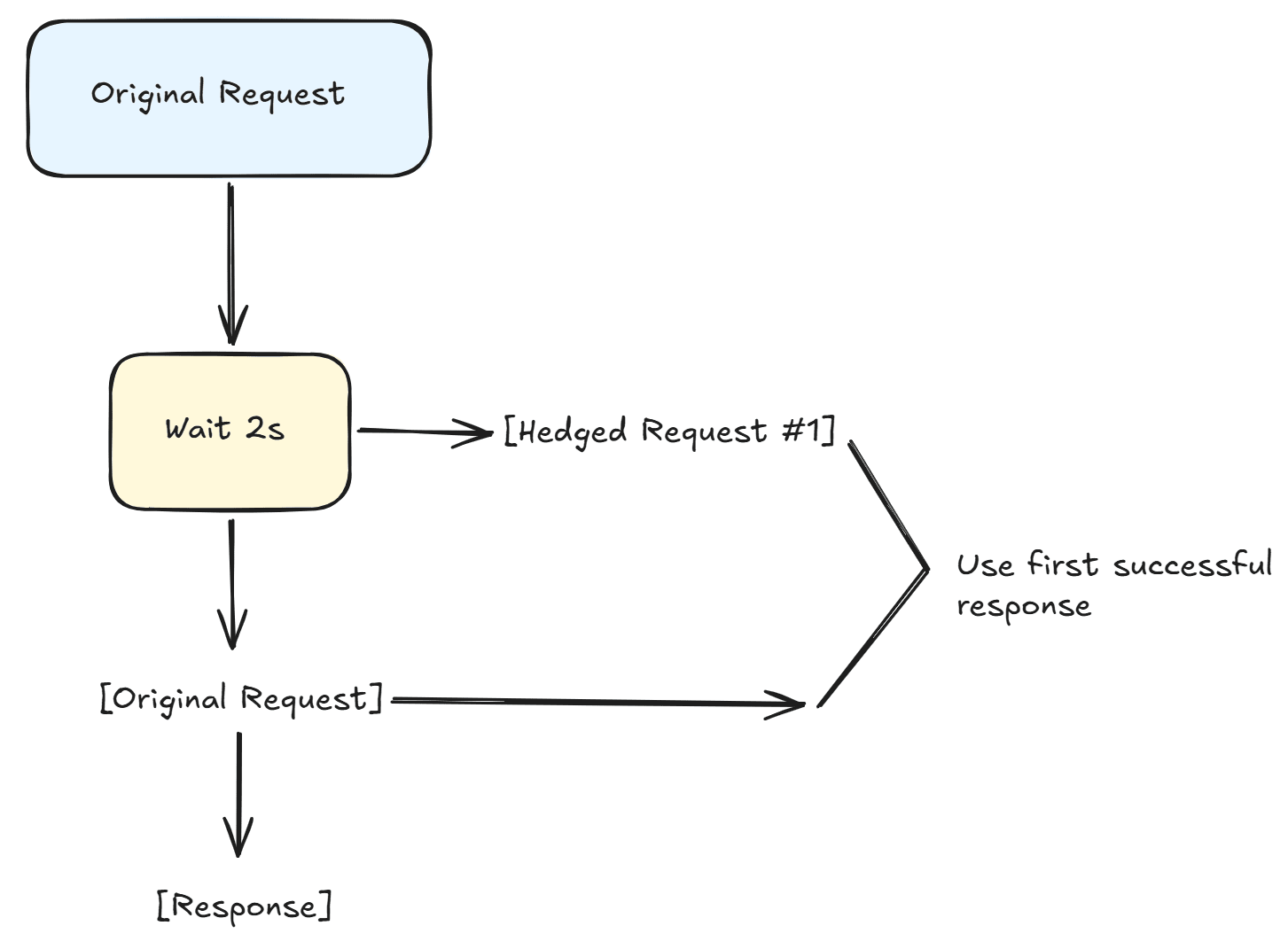
This is the flow:
- The original request is sent.
- The application waits 2 seconds before sending the first hedged request.
- If the original request completes successfully before the hedged request finishes, that result is used ([Original] → [Response]). If the hedged request finishes first, its response is used instead, and the original request is cancelled.
This strategy is useful when:
- You have multiple instances of a downstream service and want to reduce latency by sending parallel requests and using the fastest response.
- Low latency is more important than conserving network resources, and you are willing to trade extra requests for faster overall performance.
Real-world use cases for Hedging Strategy
This strategy is especially valuable when low latency and high reliability are critical.
For example, a travel booking platform querying multiple airline APIs can send parallel requests for the same flight, using the first successful response to provide the user with immediate results while cancelling slower or failing requests.
Similarly, a stock trading application fetching real-time market data from multiple providers can hedge requests to ensure that the fastest data is used, reducing the risk of delays that could impact trading decisions.
Another scenario is a content delivery system that fetches media or personalisation data from multiple edge servers; by hedging requests, the system can respond quickly even if some servers are slow or temporarily unreachable, ensuring a smooth user experience.
In each case, hedging improves responsiveness and reliability without waiting for retries to occur sequentially.
Configuring the Hedging Strategy
To configure the Hedging Strategy, we can use the following properties:
MaxHedgedAttempts: The maximum number of additional parallel requests to send. For example,2means up to 2 hedged requests in addition to the original, for a total of 3 attempts.Delay: How long to wait before sending the next hedged request. If the original request completes (successfully or with a handled failure) before the delay, the hedging triggers immediately.ShouldHandle: Defines which outcomes trigger hedging. Similar to other strategies, this is a predicate that examines the result (exception or HTTP response).
Let's add the hedging HttpClient registration:
public static IServiceCollection AddHedgingClient(this IServiceCollection services, Uri baseAddress)
{
    services.AddHttpClient("UnreliableWeatherApi-Hedging", client =>
    {
        client.BaseAddress = baseAddress;
    })
    .AddResilienceHandler("hedging", pipelineBuilder =>
    {
        pipelineBuilder.AddHedging(new HedgingStrategyOptions<HttpResponseMessage>
        {
            MaxHedgedAttempts = 2,
            Delay = TimeSpan.FromSeconds(2),
            ShouldHandle = static args => ValueTask.FromResult(
                args.Outcome.Exception is not null ||
                args.Outcome.Result?.IsSuccessStatusCode == false),
            OnHedging = static args =>
            {
                Console.WriteLine($"Hedging: attempt #{args.AttemptNumber} started.");
                return default;
            }
        });
    });

    return services;
}- On line 9,
AddHedgingis called withHedgingStrategyOptions<HttpResponseMessage>(similar to the fallback strategy, hedging uses the generic options class since there is no HTTP-specific variant for hedging inMicrosoft.Extensions.Http.Resilience). TheHttpResponseMessagetype parameter tells Polly that the hedged action returns an HTTP response. - On line 11,
MaxHedgedAttemptsis set to 2, which means that Polly will send up to 2 additional requests if the original fails, meaning that each call can try up to three times in parallel. - On line 12,
Delayis set to 2 seconds. If the original request has not completed after 2 seconds, Polly sends the first hedged request. If neither the original nor the first hedged request has completed after another 2 seconds, Polly sends the second hedged request. - On lines 13 to 15, the
ShouldHandledelegate defines when hedging should trigger. If the original request fails with an exception or returns a non-success HTTP status code, the hedging activates and sends an additional request. - On lines 16 to 20, the
OnHedgingcallback logs each hedged attempt. Theargs.AttemptNumberproperty indicates which hedged attempt is being started (it starts at 0 for the first hedged attempt, and 1 for the second).
Note that when the original request fails quickly (for example, the /api/weather endpoint returns a 500 immediately), the hedging does not wait for the Delay before sending the next attempt. The delay only applies when the original request is still in-flight. This means hedging can function similarly to retry for fast-failing endpoints, but unlike retry, it can also send requests in parallel when responses are slow.
The Hedging Controller
Now let's create the GetWithHedging method on the HedgingController:
[HttpGet("weather")]
public async Task<IActionResult> GetWithHedging()
{
    var client = _httpClientFactory.CreateClient("UnreliableWeatherApi-Hedging");
    var response = await client.GetAsync("/api/weather");

    if (response.IsSuccessStatusCode)
    {
        var content = await response.Content.ReadAsStringAsync();
        return Content(content, "application/json");
    }

    return StatusCode((int)response.StatusCode);
}- On line 5, we send the request to the
/api/weatherendpoint, which fails approximately 67% of the time. Hedging with 2 extra attempts increases the success rate significantly. The hedging will make up to 3 total attempts (1 original + 2 hedged). The probability of all 3 failing is approximately 30%, so the success rate improves from roughly 33% (without hedging) to approximately 70%. - Unlike the retry strategy, hedging does not need a
try/catchblock for its own exceptions. If all hedged attempts fail, the last result is returned to the caller, either the HTTP response or the exception from the final attempt. Since this endpoint returns HTTP responses (not exceptions), the controller checksIsSuccessStatusCodeto determine the outcome.
Combining Multiple Strategies
The real power of Polly becomes apparent when you combine multiple strategies into a single resilience pipeline. Each strategy addresses a different type of failure, and together they provide comprehensive protection.
The order in which the strategies are added to the pipeline matters. Strategies added first are the outermost, and they wrap the strategies added after them. A common pattern is:
- Timeout (outermost): sets a total time limit for the entire operation, including retries
- Retry (middle): retries failed requests with exponential backoff
- Circuit Breaker (innermost): prevents calling a service that is consistently failing
In this example, timeouts wrap retries, which wrap the circuit breaker. That way, each layer handles failures in the right sequence.
When a request is made through this pipeline:
- The Timeout strategy starts its timer
- The request passes to the Retry strategy
- The Retry strategy passes it to the Circuit Breaker
- The Circuit Breaker passes it to the actual HTTP call
- If the call fails, the Circuit Breaker records the failure and returns the error
- The Retry strategy catches the failure and retries (going through the Circuit Breaker again)
- If too many retries happen and the total timeout is exceeded, the Timeout strategy cancels everything
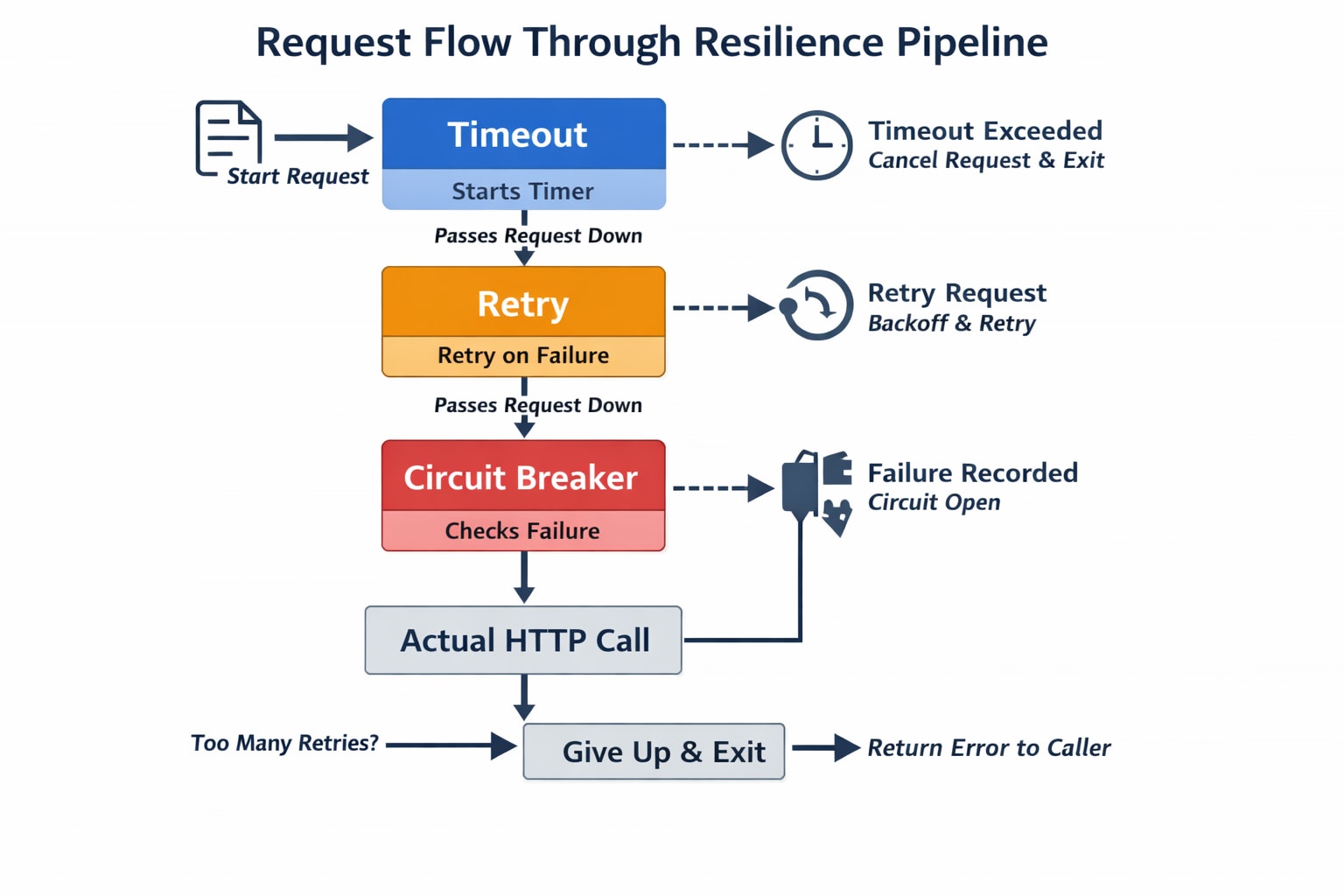
Wrapping strategies in this order ensures each layer addresses failures appropriately: timeouts prevent long waits, retries handle transient failures, and the circuit breaker stops overwhelming a failing service.
Configuring the Combined Strategy
Now let's add the combined HttpClient registration:
public static IServiceCollection AddCombinedClient(this IServiceCollection services, Uri baseAddress)
{
    services.AddHttpClient("UnreliableWeatherApi-Combined", client =>
    {
        client.BaseAddress = baseAddress;
    })
    .AddResilienceHandler("combined", pipelineBuilder =>
    {
        pipelineBuilder.AddTimeout(new TimeoutStrategyOptions
        {
            Timeout = TimeSpan.FromSeconds(30),
            OnTimeout = static args =>
            {
                Console.WriteLine($"Total request timed out after {args.Timeout.TotalSeconds:F1}s");
                return default;
            }
        });

        pipelineBuilder.AddRetry(new HttpRetryStrategyOptions
        {
            MaxRetryAttempts = 3,
            Delay = TimeSpan.FromSeconds(1),
            BackoffType = DelayBackoffType.Exponential,
            UseJitter = true,
            OnRetry = OnRetry
        });

        pipelineBuilder.AddCircuitBreaker(new HttpCircuitBreakerStrategyOptions
        {
            FailureRatio = 0.5,
            SamplingDuration = TimeSpan.FromSeconds(10),
            MinimumThroughput = 3,
            BreakDuration = TimeSpan.FromSeconds(5),
            OnOpened = args =>
            {
                Console.WriteLine($"[Combined] Circuit OPENED. Break duration: {args.BreakDuration.TotalSeconds:F1}s");
                return default;
            },
            OnClosed = args =>
            {
                Console.WriteLine("[Combined] Circuit CLOSED. Requests flowing normally.");
                return default;
            },
            OnHalfOpened = args =>
            {
                Console.WriteLine("[Combined] Circuit HALF-OPENED. Testing with next request...");
                return default;
            }
        });
    });

    return services;
}- On line 9,
AddTimeoutis added first, making it the outermost strategy. The total timeout is set to 30 seconds, which is the maximum duration for the entire operation including all retries. If the total time exceeds 30 seconds (retries included), the timeout cancels the operation. - On line 19,
AddRetryis added second. It uses exponential backoff with jitter and up to 3 retry attempts. When an individual request fails, the retry strategy waits and tries again, up to 3 times. - On line 28,
AddCircuitBreakeris added third, making it the innermost strategy; it directly wraps the HTTP call. If 50% or more of requests fail within the 10-second sampling window (with at least 3 requests), the circuit opens and rejects subsequent requests for 5 seconds.
The combined pipeline logs are prefixed with [Combined] to distinguish them from the standalone circuit breaker logs when running the demo.
The Combined Controller
Now let's create the GetWithCombinedPipeline method on the CombinedController:
[HttpGet("weather")]
public async Task<IActionResult> GetWithCombinedPipeline()
{
    try
    {
        var client = _httpClientFactory.CreateClient("UnreliableWeatherApi-Combined");
        var response = await client.GetAsync("/api/weather/unstable");

        if (response.IsSuccessStatusCode)
        {
            var content = await response.Content.ReadAsStringAsync();
            return Content(content, "application/json");
        }

        return StatusCode((int)response.StatusCode);
    }
    catch (BrokenCircuitException)
    {
        return StatusCode(503, new { Message = "Circuit breaker is open. Service is temporarily unavailable." });
    }
    catch (TimeoutRejectedException)
    {
        return StatusCode(504, new { Message = "Request timed out." });
    }
}- On line 7, a request is send to the
/api/weather/unstableendpoint, which follows a 20-second cycle: 12 seconds of failures (500) followed by 8 seconds of success (200). - On lines 17 to 20,
BrokenCircuitExceptionis caught if the circuit breaker opens (after too many failures), preventing further retries. - On lines 21 to 24,
TimeoutRejectedExceptionis caught. If the total operation (including retries) exceeds 30 seconds, the timeout strategy cancels everything.
AddStandardResilienceHandler
Instead of manually composing individual strategies, Microsoft.Extensions.Http.Resilience package also provides AddStandardResilienceHandler: a built-in method that configures a pre-composed resilience pipeline with sensible defaults. This method simplifies setup and reduces human error when combining strategies manually and it is the recommended starting point for most applications.
The standard resilience handler includes the following strategies (from outermost to innermost):
- Rate Limiter: controls overall concurrency
- Total Request Timeout: sets a time limit for the entire operation (default: 30 seconds)
- Retry: retries failed requests with exponential backoff (default: 3 attempts)
- Circuit Breaker: opens after too many failures in a time window
- Attempt Timeout: sets a time limit for each individual attempt (default: 10 seconds)
This is the same set of strategies you would compose manually, but pre-configured and ready to use. You can customise any of the default values through the options parameter.
Let's add the standard resilience HttpClient registration:
public static IServiceCollection AddStandardResilienceClient(this IServiceCollection services, Uri baseAddress)
{
    services.AddHttpClient("UnreliableWeatherApi-Standard", client =>
    {
        client.BaseAddress = baseAddress;
    })
    .AddStandardResilienceHandler(options =>
    {
        options.Retry.MaxRetryAttempts = 3;
        options.Retry.Delay = TimeSpan.FromSeconds(1);
        options.CircuitBreaker.BreakDuration = TimeSpan.FromSeconds(5);
        options.TotalRequestTimeout.Timeout = TimeSpan.FromSeconds(30);
        options.AttemptTimeout.Timeout = TimeSpan.FromSeconds(5);
    });

    return services;
}- On line 7,
AddStandardResilienceHandleris called instead ofAddResilienceHandler. This method configures the entire pipeline automatically. The lambda parameter lets you customize the defaults. - On line 9,
Retry.MaxRetryAttemptsis set to 3 retries. - On line 10,
Retry.Delayis set to 1 second as the base delay for exponential backoff. - On line 11,
CircuitBreaker.BreakDurationis set to 5 seconds. - On line 12,
TotalRequestTimeout.Timeoutis set to 30 seconds for the overall operation. - On line 13,
AttemptTimeout.Timeoutis set to 5 seconds per individual attempt. This means each individual HTTP call (before retry) will be canceled if it takes longer than 5 seconds.
Notice how much simpler this is compared to the manual combined pipeline. You don't need to import strategy-specific namespaces, create individual strategy option objects, or worry about the order of strategies. The AddStandardResilienceHandler method handles all of that for you.
The Standard Controller
Now let's create the GetWithStandardResilience method on the StandardController:
[HttpGet("weather")]
public async Task<IActionResult> GetWithStandardResilience()
{
    try
    {
        var client = _httpClientFactory.CreateClient("UnreliableWeatherApi-Standard");
        var response = await client.GetAsync("/api/weather");

        if (response.IsSuccessStatusCode)
        {
            var content = await response.Content.ReadAsStringAsync();
            return Content(content, "application/json");
        }

        return StatusCode((int)response.StatusCode);
    }
    catch (BrokenCircuitException)
    {
        return StatusCode(503, new { Message = "Circuit breaker is open. Service is temporarily unavailable." });
    }
    catch (TimeoutRejectedException)
    {
        return StatusCode(504, new { Message = "Request timed out." });
    }
}- On line 7, the request is sent to the
/api/weatherendpoint, which fails about 67% of the time. With the standard resilience handler retrying up to 3 times, the overall success rate jumps to roughly 80%. - The exception handling pattern is the same as the combined controller: both
BrokenCircuitExceptionandTimeoutRejectedExceptionare caught.
Registering the New Clients in Program.cs
With the extension methods defined, registering the new clients in Program.cs requires four additional lines:
using HttpResilienceDemo.ResilientApi.Extensions;

var builder = WebApplication.CreateBuilder(args);

builder.Services.AddControllers();

var unreliableWeatherApiBaseAddress = new Uri(builder.Configuration["UnreliableWeatherApi:BaseAddress"]!);

builder.Services
    .AddConstantRetryClient(unreliableWeatherApiBaseAddress)
    .AddLinearRetryClient(unreliableWeatherApiBaseAddress)
    .AddExponentialRetryClient(unreliableWeatherApiBaseAddress)
    .AddSelectiveRetryClient(unreliableWeatherApiBaseAddress)
    .AddRetryAfterClient(unreliableWeatherApiBaseAddress)
    .AddCircuitBreakerClient(unreliableWeatherApiBaseAddress)
    .AddTimeoutClient(unreliableWeatherApiBaseAddress)
    .AddFallbackClient(unreliableWeatherApiBaseAddress)
    .AddTimeoutFallbackClient(unreliableWeatherApiBaseAddress)
    .AddRateLimiterClient(unreliableWeatherApiBaseAddress)
    .AddHedgingClient(unreliableWeatherApiBaseAddress)
    .AddCombinedClient(unreliableWeatherApiBaseAddress)
    .AddStandardResilienceClient(unreliableWeatherApiBaseAddress);

var app = builder.Build();

app.UseHttpsRedirection();

app.MapControllers();

app.Run();- On lines 19 to 22, the four new resilient
HttpClientregistrations are chained to the existing ones:AddRateLimiterClient,AddHedgingClient,AddCombinedClient, andAddStandardResilienceClient.
Running the Demo
To run the demo, start both applications. First, start the UnreliableWeatherApi:
dotnet run --project src/HttpResilienceDemo.UnreliableWeatherApiThen, in a separate terminal, start the ResilientApi:
dotnet run --project src/HttpResilienceDemo.ResilientApiTesting the Rate Limiter
The Rate Limiter is best tested by sending multiple concurrent requests. In PowerShell, you can use parallel jobs:
With PowerShell 7+:
1..6 | ForEach-Object -Parallel {
    Invoke-RestMethod https://localhost:5002/api/rate-limiter/weather
} -ThrottleLimit 6
If you do not have PowerShell 7+, this is the compatible version for PowerShell 5.1:
1..6 | ForEach-Object {
    Start-Job {
        Invoke-RestMethod https://localhost:5002/api/rate-limiter/weather
    }
} | Wait-Job | Receive-Job
For bash use:
# Run 6 requests in parallel and collect responses in an array
responses=()

for i in {1..6}; do
  # Run curl in background and save output to a temporary file
  curl -s https://localhost:5002/api/rate-limiter/weather > "response_$i.json" &
done

# Wait for all background jobs to finish
wait

# Read responses into an array
for i in {1..6}; do
  responses+=("$(<response_$i.json)")
  rm "response_$i.json"  # clean up
done

# Print all responses
for resp in "${responses[@]}"; do
  echo "$resp"
done
This sends 6 concurrent requests. Since PermitLimit is 2 and QueueLimit is 2, only 4 requests can be handled (2 executing + 2 queued). The remaining 2 requests will be rejected with a 429 status code and the message "Rate limit exceeded. Too many concurrent requests."
Testing the Hedging Strategy
curl https://localhost:5002/api/hedging/weatherCall this endpoint multiple times. The /api/weather endpoint has a 67% failure rate per attempt, but with hedging (up to 3 total attempts), the success rate improves to approximately 70%. Watch the ResilientApi console output to see the hedging attempts:
Hedging: attempt #0 started.
Hedging: attempt #1 started.
When the original request fails, the hedging immediately sends another request. If that also fails, a third attempt is made.
Testing the Combined Pipeline
curl https://localhost:5002/api/combined/weatherCall this endpoint repeatedly in quick succession to observe the combined behavior. During the failure period of the /api/weather/unstable endpoint (first 12 seconds of each 20-second cycle), you will see:
- Retry attempts as the retry strategy tries to get a successful response:
Retry attempt 1 after 1.1s delay. Status: InternalServerError
Retry attempt 2 after 1.8s delay. Status: InternalServerError
Retry attempt 3 after 3.7s delay. Status: InternalServerError- After enough failures, the circuit breaker opens:
[Combined] Circuit OPENED. Break duration: 5.0sSubsequent requests are rejected immediately without making an HTTP call, and the controller returns 503.
After 5 seconds, the circuit transitions to half-open:
[Combined] Circuit HALF-OPENED. Testing with next request...- If the next request succeeds (during the success period), the circuit closes:
[Combined] Circuit CLOSED. Requests flowing normally.Testing the Standard Resilience Handler
curl https://localhost:5002/api/standard/weatherThe behavior is similar to the combined pipeline but requires no manual configuration of strategy order or options classes. Call this endpoint multiple times to observe the retry behavior. Since the /api/weather endpoint has a 67% failure rate, you will see retry logs for most requests, and the overall success rate will be approximately 80%.
Conclusion
In this article, I demonstrated the Rate Limiter and Hedging strategies in Polly v8, and showed how to combine multiple strategies into a comprehensive resilience pipeline.
The Rate Limiter controls concurrency to avoid overloading downstream services, while the Hedging Strategy sends parallel requests to reduce latency and improve the chances of getting a successful response quickly. Combining strategies into a single pipeline gives you very good protection against failures.
For most applications, AddStandardResilienceHandler provides pre-configurable defaults for Retry, Circuit Breaker, Rate Limiter, Timeout and Attempt Timeout. For specific requirements, you can combine individual strategies into custom pipelines.
The key takeaway is to always consider what can go wrong with your external dependencies and configure the appropriate resilience strategy. As presented in this series, Microsoft.Extensions.Http.Resilience, powered by Polly, provides a complete toolkit for building resilient .NET applications.
This is the link for the project in GitHub: https://github.com/henriquesd/HttpResilienceDemo
If you like this demo, I kindly ask you to give a ⭐ in the repository.
Thanks for reading!
References