Model Context Protocol (MCP) is an open-source standard introduced by Anthropic that defines how AI applications communicate with external systems. It provides a standardised way for AI applications, such as Claude, ChatGPT, and others, to discover available capabilities and interact with external functionality, enabling them to access data and invoke operations without requiring custom integrations for every system. In this article, I present how to build an MCP Server using .NET.
The Problem MCP Solves
Imagine a company where product information lives in SQL Server, information is exposed through REST APIs, source code is stored in GitHub, documents are stored in Azure Blob Storage, and contains data in CRM systems, etc. If you want an AI application (such as ChatGPT or Claude) to access these systems, you would traditionally need to build separate integrations for each one.
MCP solves this problem by introducing a standard protocol for connecting AI applications to external systems. Instead of creating custom integrations for every AI application and every system, you expose capabilities through MCP, allowing any compatible AI application to discover and use them.
A common illustration of an MCP, is to think of MCP as USB-C for AI applications. USB-C defines a common interface that allows different devices and accessories to communicate. Similarly, MCP defines a common protocol that allows AI applications to interact with different tools and data sources without requiring a custom integration for each one.
MCP Architecture
The MCP Architecture consists of three main components, the MCP Host, MCP Client and MCP Server:
1. MCP Host
The MCP Host is the AI application that the user interacts with, and it is responsible for orchestrating the overall AI experience. It provides the user interface, manages the conversation and context, integrates with the AI model, and coordinates the use of external capabilities exposed through the MCP protocol.
The host manages interactions between the user, the AI model, and MCP Clients. It creates and manages MCP Clients, which handle communication with MCP Servers.
Note that an MCP Host does not directly communicate with MCP Servers, instead, it creates MCP Clients that handle the MCP protocol communication with servers.
Examples of MCP Hosts include Claude Desktop, AI-powered IDEs, and custom AI applications. Some AI assistants can also provide MCP host capabilities depending on their implementation.
2. MCP Client
The MCP Client is the component responsible for communicating with MCP servers using the MCP protocol. It is created and managed by an MCP Host (such as Claude Desktop, ChatGPT, an AI-powered IDE, or a custom AI application). Typically, the host creates an MCP client connection for each MCP server it connects to.
The MCP Client acts as the communication layer between the AI application and external capabilities exposed by MCP servers. It establishes and maintains connections with MCP servers, discovers the capabilities they expose (such as tools, resources, and prompts), and sends requests to execute those capabilities.
For example, when a user asks an AI application to "find all electronics products", the AI model determines that it needs external information and determines that invoking one of the available tools would help answer the user's request.
The MCP Client establishes a connection with the MCP Server, discovers its available capabilities during initialisation, and invokes those capabilities when instructed by the MCP Host/AI Application.The MCP Server executes the operation and returns the result through the MCP protocol, which is then provided back to the AI model.
The MCP Client is responsible for MCP communication and does not normally implement the business logic exposed by MCP Servers. Its responsibility is to handle MCP communication, while the MCP Server is responsible for exposing capabilities and controlling what operations are allowed.
In most AI applications, the MCP Client is an internal component that developers do not interact with directly. However, developers can also build their own MCP Client, as demonstrated in this article with the ProductCatalogMcp.ConsoleClient console application. This custom client connects to the MCP Server, discovers its available tools, and invokes them programmatically without requiring an AI Host.
3. MCP Server
The MCP Server is the application that exposes capabilities to MCP Clients through the MCP protocol. These capabilities can include tools, resources, and prompts that an AI application can use to retrieve information or perform actions.
An MCP Server acts as a controlled gateway between MCP Clients and external capabilities. It is an adapter layer that exposes existing functionality/capabilities through the MCP protocol. It can expose capabilities that retrieve information from databases, call REST APIs, access files, interact with cloud resources, execute business operations, or any other data source or functionality that needs to be made available to an AI model.
The MCP Server defines which capabilities are exposed and controls which operations are allowed. The AI application never accesses these systems directly, instead, it communicates through the MCP Client, which invokes capabilities exposed/provided by the MCP Server. For example, an MCP Server might expose a search_products tool that internally calls a REST API or a get_customer_information tool that queries a database.
MCP Primitives
MCP primitives define what clients and servers can offer each other. These primitives specify the types of contextual information that can be shared with AI applications and the range of actions that can be performed. MCP defines three core primitives that MCP Servers can provide/expose and MCP Clients can consume: Tools, Resources and Prompts:
1. Tools
Tools are executable functions that AI applications can call to perform actions or operations, such as querying a database, calling an API, creating a record, etc. The AI model decides when a tool should be called based on the available tool definitions and the user's request (technically, the LLM does not "call" tools itself, the host executes the tool invocation). For example, create an order, send an email, query information, deploy an app, etc.
For example, imagine you have an MCP Server connected to a product catalog. The server could expose a tool called search_products:
Tool: search_products

Description:
Searches for products by product name or category name.

Input:
{
  "query": "electronics"
}
If a user asks an AI application something like "What electronics products do we have?", the AI model can see that search_products tool is available and determine that it is relevant to the request; the host then asks the MCP Client to invoke the tool.
Note that the tool is not the AI model and it is not the database; a tool is an operation exposed by the MCP Server that the AI application can request through the MCP protocol.
You can think of an MCP Tool as something similar to an endpoint in a Web API: both expose a specific operation that a client can invoke with defined inputs and receive a result.
For example, the following code registers a search_products tool:
[McpServerTool(Name = "search_products"),
 Description("Searches for products by product name or category name. " +
            "The search is case-insensitive and matches partial names.")]
public async Task<IReadOnlyList<Product>> SearchProducts(
    [Description("The product name or category name (or part of it) to search for.")]
    string query,
    CancellationToken cancellationToken)
{
    var result = await apiClient.SearchProductsAsync(query, cancellationToken);
    return result;
}
In this example:
search_productsis the name of the tool that the MCP client discovers.- The
Descriptiontells the AI application what the tool does and helps the model determine when it should be used. - The
queryparameter defines the input required by the tool. - The
[Description]attribute provides additional information about the parameter. - The method implementation calls the existing
ProductCatalog.WebApithroughProductApiClientand returns the products.
Conceptually, this is similar to having a Web API endpoint such as:
GET /api/products/search?query=electronicsThe important difference is that the MCP tool is exposed through the MCP protocol, rather than as an HTTP endpoint. The MCP Client can discover the tool, its description, and its input schema, allowing an AI application to determine when and how to invoke it.
2. Resources
Resources are Data sources that provide contextual information to AI applications, such as file contents, documents, database records, API responses, etc). Resources represent contextual data that can be provided to AI applications. They are typically retrieved by the MCP Client and provided as context to the AI model through the host application.
3. Prompts
Prompts are reusable prompt templates exposed by MCP servers. They help standardise common interactions by providing predefined instructions, examples, or workflows that can be used by AI applications.
MCP Transport Mechanisms
The transport layer manages communication channels and authentication between clients and servers. It handles connection establishment, message framing, and secure communication between MCP participants. MCP supports two transport mechanisms for the communication between client and server: Stdio and Streamable HTTP:
- Stdio: Uses standard input/output streams for direct process communication between local processes on the same machine, providing optimal performance with no network overhead. The client starts the server as a child process and communicates with it through the standard input and output streams. This is the most common option for servers that run locally on the same machine as the host.
- Streamable HTTP: Uses HTTP POST for client-to-server messages with optional Server-Sent Events for streaming capabilities. This transport enables remote server communication and supports standard HTTP authentication methods including bearer tokens, API keys, and custom headers. The client communicates with the server through HTTP requests. This is the option to use when the server runs remotely, for example when it is deployed to the cloud and shared by multiple users.
For production deployments, MCP's authorization specification recommends OAuth-based authorization flows.
Regardless of the transport used (stdio or Streamable HTTP), MCP messages are exchanged using JSON-RPC.
Note: earlier versions of MCP used HTTP with Server-Sent Events (SSE) as a transport mechanism. Streamable HTTP replaces this approach by supporting both regular HTTP requests and streaming capabilities.
MCP Flow
Here is an illustration of the MCP flow:
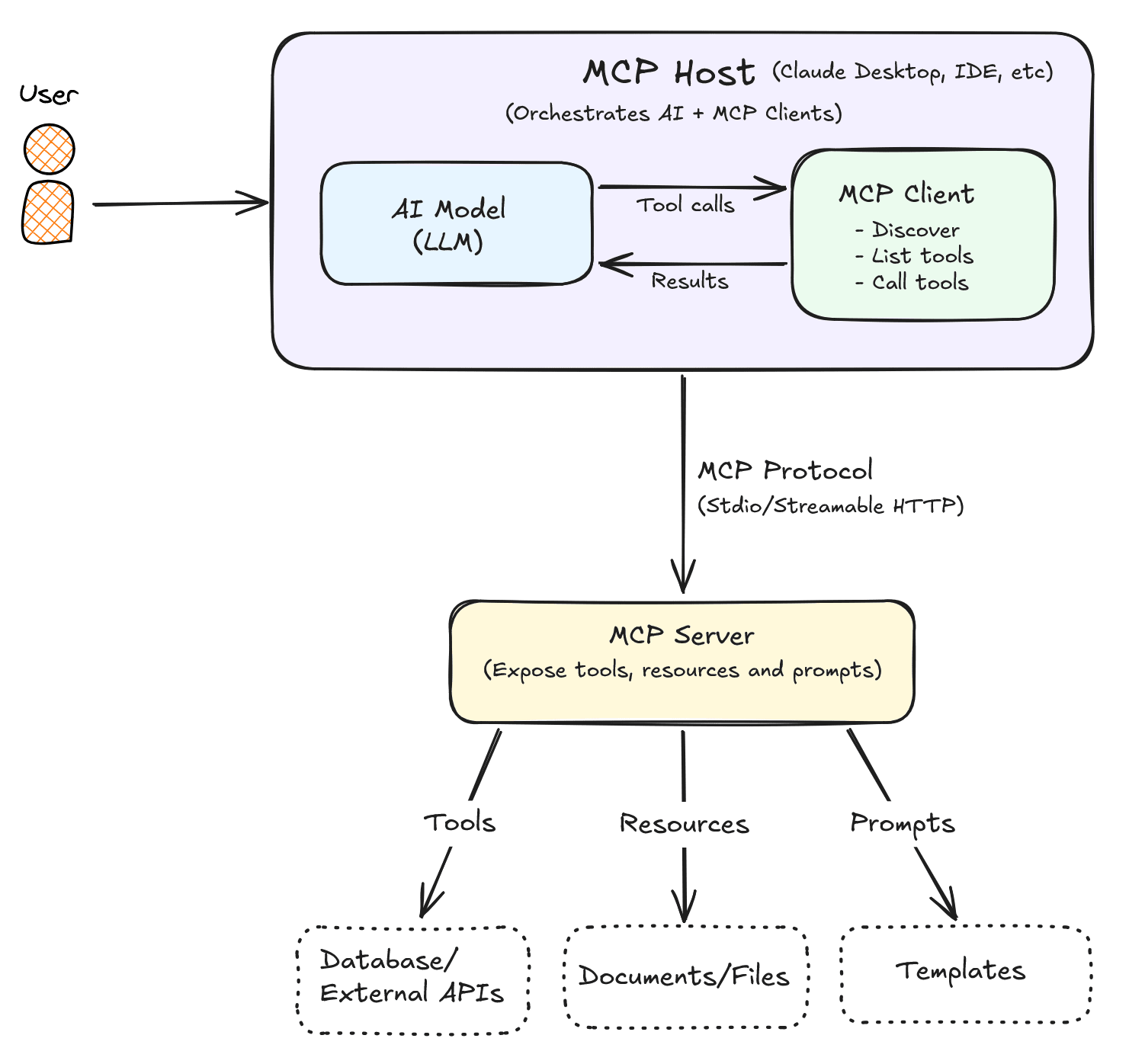
- The user sends a request to the MCP Host.
- The host sends the conversation and the available MCP capabilities to the AI model.
- The AI model determines that a tool or resource is required.
- The host instructs its MCP Client to invoke the selected capability.
- The MCP Client communicates with the MCP Server.
- The MCP Server executes the requested operation.
- The result is returned through the MCP Client to the host.
- The AI model generates the final response for the user.
Note that the AI does not directly access databases or APIs.
Demo Project - Console, Stdio & Streamable HTTP
Now that the main concepts behind MCP are covered, let's implement an MCP Server in a .NET project. In this demo project, I present the three different flows:
- Flow 1: a custom Console client invoking tools over the Stdio transport.
- Flow 2: an MCP-compatible host (e.g. Claude Desktop) communicating with the same server over Stdio.
- Flow 3: the same tools exposed over HTTP for clients that need a network-addressable server rather than a local process.
Here is a visual representation of each flow:
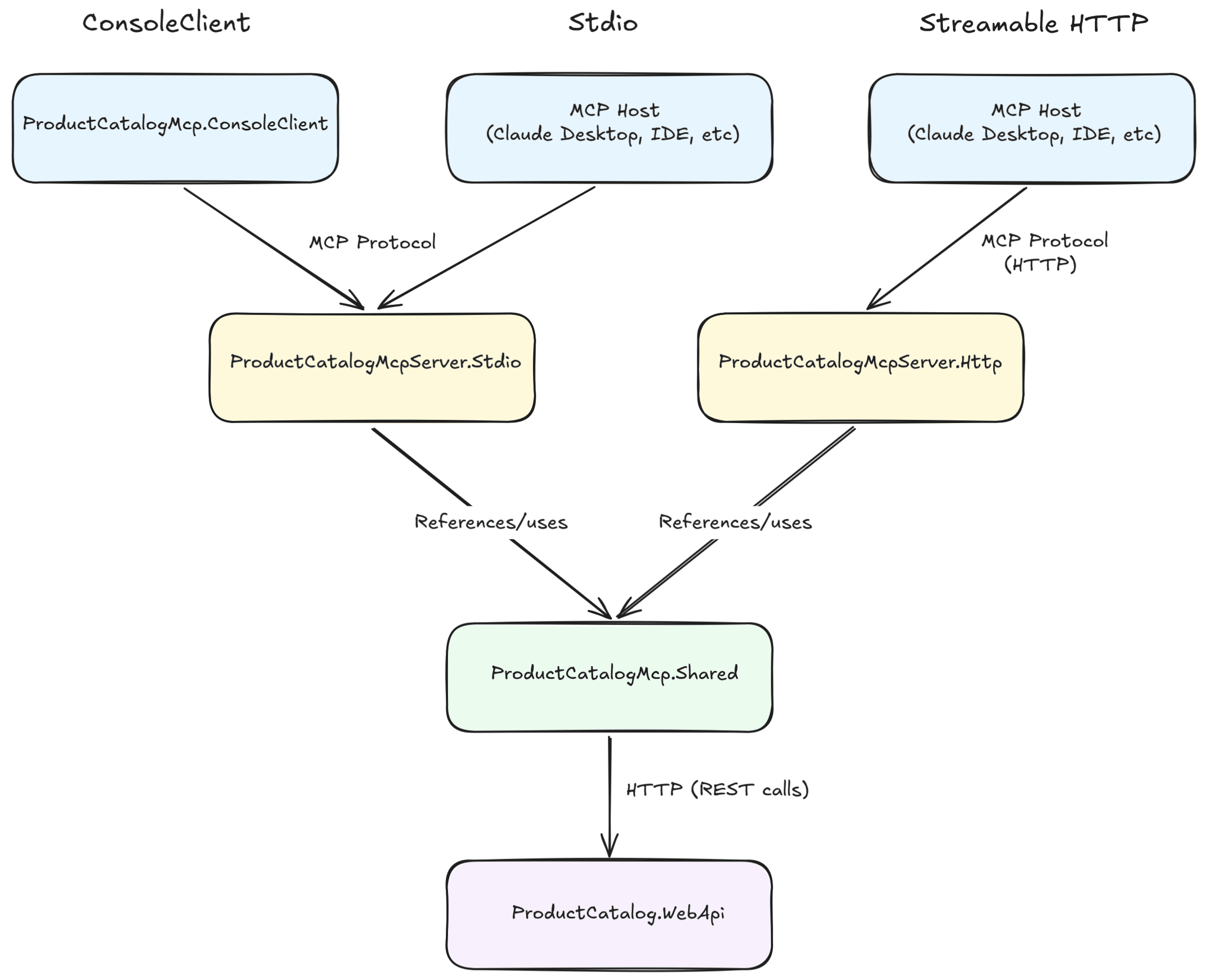
This is what is implemented in this demo:
- An MCP Server built with the official MCP C# SDK that exposes application capabilities through the MCP protocol.
- Custom MCP tools that expose product catalog functionality (
get_products,search_products,add_product, etc.). - A custom MCP Client Console Application that connects to the MCP Server, discovers its available tools, and invokes them programmatically through the MCP protocol. This demonstrates how an application can act as an MCP client. This is only used for demonstration purposes, in real-world scenarios this role is usually handled internally by an MCP Host such as Claude Desktop, ChatGPT, or another AI-powered application.
- Support for both Stdio and Streamable HTTP transports, allowing the same MCP Server and tools to be accessed either as a local child process or remotely over HTTP.
- API key protection on the Streamable HTTP server's public-facing
/mcpendpoint (the client-facing boundary of an MCP deployment). Note that, as mentioned previously, the MCP specification recommends OAuth for production deployments, an API key is used here only to keep the demo simpler and focused.
Tip: The MCP Client is not tied to the Console Application. MCP Client is a component that exists inside an MCP Host.
The MCP Server does not directly access the database, instead, it consumes an existing Web API. This pattern allows organisations to expose existing business capabilities through MCP without duplicating domain logic.
Project Structure
For this demo, we will use ModelContextProtocol package, which is the official MCP C# SDK which is available through NuGet, and enables you to build MCP clients and servers for .NET apps.
This demo contains five projects:
- ProductCatalog.WebApi: An ASP.NET Core Web API backed by SQL Server (via EF Core). Owns the actual data models, migrations, and REST endpoints. This project knows nothing about MCP, it's just a common Web API.
- ProductCatalogMcp.Shared: A class library with the MCP tool logic, written once and reused by both server hosts below (this avoids duplicating tool implementations across different transports). Contains the DTOs, ProductApiClient (an HttpClient wrapper calling the Web API's REST endpoints), and ProductTools (the [McpServerTool] methods).
- ProductCatalogMcpServer.Stdio: A thin console host. Wires ProductCatalogMcp.Shared's tools to the stdio transport, so an MCP client/host (Claude Desktop, VS Code, the Inspector, or the custom client below) can spawn it as a local child process.
- ProductCatalogMcpServer.Http: A thin ASP.NET Core host. Wires the exact same tools to the Streamable HTTP transport instead, listening on http://localhost:3001 with the MCP endpoint at /mcp, for remote/networked access.
- ProductCatalogMcp.ConsoleClient: A console app demonstrating how to build your own MCP client. It launches ProductCatalogMcpServer.Stdio as a subprocess, lists its tools, and calls search_products.
This is an overview of each project's responsibility:
| Project | Type | Responsibility |
|---|---|---|
ProductCatalog.WebApi |
ASP.NET Core Web API | Exposes the REST API and manages the SQL Server database. |
ProductCatalogMcp.Shared |
Class Library | Contains the shared MCP tools, DTOs, and ProductApiClient used by both server hosts. |
ProductCatalogMcp.ConsoleClient |
Console Application | Demonstrates how to build and use a custom MCP client. |
ProductCatalogMcpServer.Stdio |
Console Application | Hosts the MCP server using the Stdio transport. |
ProductCatalogMcpServer.Http |
ASP.NET Core Application | Hosts the same MCP server using the Streamable HTTP transport. Protected by an API key. |
Both server hosts (Stdio and Streamable HTTP) call ProductCatalog.WebApi over HTTP for data, neither touches SQL Server directly. The transport (stdio vs. HTTP) only affects how a client reaches the MCP server; it's unrelated to how the server reaches its own backend.
Docker Compose
For the SQL Server Database, there is a docker-compose.yml that can be run. This spins up a SQL Server 2022 container and exposes it on the standard port 1433 so the Web API can connect to it locally as if it were a normal SQL Server instance:
services:
  sqlserver:
    image: mcr.microsoft.com/mssql/server:2022-latest
    container_name: productcatalog-sqlserver
    environment:
      ACCEPT_EULA: "Y"
      MSSQL_SA_PASSWORD: "YourStrong!Passw0rd"
    ports:
      - "1433:1433"
    volumes:
      - productcatalog-sqldata:/var/opt/mssql

volumes:
  productcatalog-sqldata:
The Web API Project
For the Web API I am not going to demonstrate the code in this article as this is just a common Web API with endpoints for Products and Categories. You can find the complete code on my GitHub.
The Shared Project
The Shared project contains records and the API Client and the Tools.
These are the Product and Category records:
public record Category(int Id, string Name);public record Product(int Id, string Name, int CategoryId, string CategoryName, decimal Price);These are the records for the Request:
public record ProductRequest(
    [Required] string Name,
    [Required] string Category,
    [Range(0.01, (double)decimal.MaxValue)] decimal Price);
public record UpdatePriceRequest(
[Range(0.01, (double)decimal.MaxValue)] decimal Price);The ProductApiClient
The ProductApiClient class is responsible for communicating with the ProductCatalog.WebApi. It uses an injected HttpClient to call the Web API endpoints for retrieving, searching, creating, updating, and deleting products.
This class is placed in the ProductCatalogMcp.Shared project so it can be reused by both the Stdio and Streamable HTTP MCP servers. This avoids duplicating the code that communicates with the Web API and keeps the MCP tools focused on exposing application capabilities rather than making HTTP requests:
public class ProductApiClient(HttpClient httpClient)
{
    public async Task<IReadOnlyList<Product>> GetProductsAsync(CancellationToken cancellationToken = default)
    {
        var products = await httpClient.GetFromJsonAsync<List<Product>>("/api/products", cancellationToken);
        return products ?? [];
    }

    public async Task<IReadOnlyList<Product>> SearchProductsAsync(string query, CancellationToken cancellationToken = default)
    {
        var products = await httpClient.GetFromJsonAsync<List<Product>>(
            $"/api/products/search?query={Uri.EscapeDataString(query)}", cancellationToken);
        return products ?? [];
    }

    public async Task<IReadOnlyList<Category>> GetCategoriesAsync(CancellationToken cancellationToken = default)
    {
        var categories = await httpClient.GetFromJsonAsync<List<Category>>("/api/categories", cancellationToken);
        return categories ?? [];
    }

    public async Task<Product> AddProductAsync(string name, string category, decimal price, CancellationToken cancellationToken = default)
    {
        var response = await httpClient.PostAsJsonAsync(
            "/api/products",
            new ProductRequest(name, category, price),
            cancellationToken);

        await ThrowIfNotSuccessAsync(response, "adding the product", cancellationToken);

        var product = await response.Content.ReadFromJsonAsync<Product>(cancellationToken);
        return product ?? throw new InvalidOperationException("The API did not return the created product.");
    }

    public async Task<Product> UpdateProductPriceAsync(int id, decimal price, CancellationToken cancellationToken = default)
    {
        var response = await httpClient.PatchAsJsonAsync(
            $"/api/products/{id}/price",
            new UpdatePriceRequest(price),
            cancellationToken);

        await ThrowIfNotSuccessAsync(response, "updating the product price", cancellationToken);

        var product = await response.Content.ReadFromJsonAsync<Product>(cancellationToken);
        return product ?? throw new InvalidOperationException("The API did not return the updated product.");
    }

    public async Task DeleteProductAsync(int id, CancellationToken cancellationToken = default)
    {
        var response = await httpClient.DeleteAsync($"/api/products/{id}", cancellationToken);
        await ThrowIfNotSuccessAsync(response, "deleting the product", cancellationToken);
    }

    private static async Task ThrowIfNotSuccessAsync(HttpResponseMessage response, string action, CancellationToken cancellationToken)
    {
        if (response.IsSuccessStatusCode)
        {
            return;
        }

        var errorBody = await response.Content.ReadAsStringAsync(cancellationToken);
        throw new InvalidOperationException(string.IsNullOrWhiteSpace(errorBody)
            ? $"The API returned {(int)response.StatusCode} while {action}."
            : errorBody);
    }
}
The ProductTools
The ProductTools class sits on top of ProductApiClient, exposing each operation as an MCP tool (in this example, get_categories, get_products, search_products, add_product, update_product_price, and delete_product). These methods define the actions that an AI client can perform against the product catalog.
Each method is decorated with [McpServerTool], which registers it as an MCP tool exposed by the server, and uses the Description attribute to supply natural-language metadata that enables the LLM to determine when the tool is appropriate based on the user's request. The AI model never sees your C# method names or implementation. Instead, it receives the tool's metadata (name, description, parameter descriptions, and schema) and uses that information to decide whether the tool is relevant for the user's request.
The MCP SDK automatically generates JSON Schema for each tool's parameters and return values. This schema, together with the tool descriptions, is sent to the AI application so it can understand how to invoke the tool correctly.
For example, if a user asks to "Find laptops under 1,000," the model may choose the search_products tool, or if they ask to "add a new product," it may invoke add_product, etc.
This is the ProductTools class:
[McpServerToolType]
public class ProductTools(ProductApiClient apiClient)
{
    [McpServerTool(Name = "get_categories"),
     Description("Returns the list of valid product categories. Call this before add_product if you are not sure which category names are valid.")]
    public async Task<IReadOnlyList<Category>> GetCategories(CancellationToken cancellationToken)
    {
        try
        {
            var result = await apiClient.GetCategoriesAsync(cancellationToken);
            return result;
        }
        catch (Exception ex) when (ex is InvalidOperationException or HttpRequestException)
        {
            throw new McpException($"Could not get the categories: {ex.Message}", ex);
        }
    }

    [McpServerTool(Name = "get_products"),
     Description("Returns the list of all products available in the catalog.")]
    public async Task<IReadOnlyList<Product>> GetProducts(CancellationToken cancellationToken)
    {
        try
        {
            var result = await apiClient.GetProductsAsync(cancellationToken);
            return result;
        }
        catch (Exception ex) when (ex is InvalidOperationException or HttpRequestException)
        {
            throw new McpException($"Could not get the products: {ex.Message}", ex);
        }
    }

    [McpServerTool(Name = "search_products"),
     Description("Searches for products by product name or category name. The search is case-insensitive and matches partial names.")]
    public async Task<IReadOnlyList<Product>> SearchProducts(
        [Description("The product name or category name (or part of it) to search for.")] string query,
        CancellationToken cancellationToken)
    {
        try
        {
            var result = await apiClient.SearchProductsAsync(query, cancellationToken);
            return result;
        }
        catch (Exception ex) when (ex is InvalidOperationException or HttpRequestException)
        {
            throw new McpException($"Could not search the products: {ex.Message}", ex);
        }
    }

    [McpServerTool(Name = "add_product"),
     Description("Adds a new product to the catalog. The category must match an existing category name (case-insensitive) — call get_categories first if unsure.")]
    public async Task<Product> AddProduct(
        [Description("The name of the product.")] string name,
        [Description("The name of an existing category, e.g. 'Electronics' or 'Books'.")] string category,
        [Description("The price of the product.")] decimal price,
        CancellationToken cancellationToken)
    {
        try
        {
            var result = await apiClient.AddProductAsync(name, category, price, cancellationToken);
            return result;
        }
        catch (Exception ex) when (ex is InvalidOperationException or HttpRequestException)
        {
            throw new McpException($"Could not add the product: {ex.Message}", ex);
        }
    }

    [McpServerTool(Name = "update_product_price"),
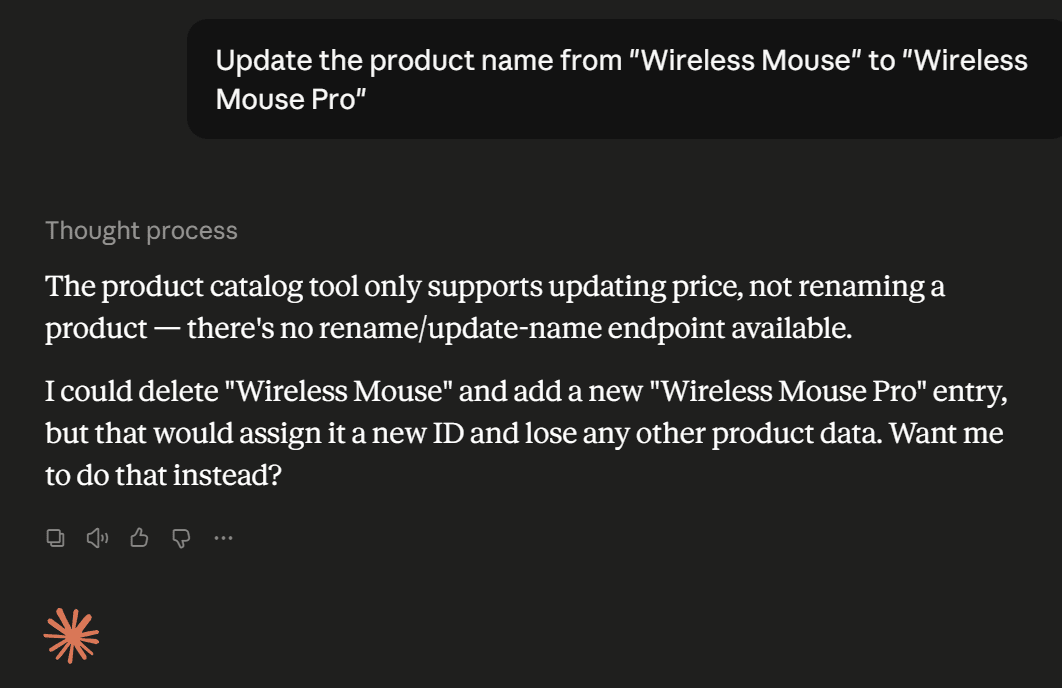
     Description("Updates the price of an existing product. Name and category cannot be changed after creation.")]
    public async Task<Product> UpdateProductPrice(
        [Description("The id of the product to update.")] int id,
        [Description("The new price of the product.")] decimal price,
        CancellationToken cancellationToken)
    {
        try
        {
            var result = await apiClient.UpdateProductPriceAsync(id, price, cancellationToken);
            return result;
        }
        catch (Exception ex) when (ex is InvalidOperationException or HttpRequestException)
        {
            throw new McpException($"Could not update the product price: {ex.Message}", ex);
        }
    }

    [McpServerTool(Name = "delete_product"),
     Description("Deletes a product from the catalog by id.")]
    public async Task<string> DeleteProduct(
        [Description("The id of the product to delete.")] int id,
        CancellationToken cancellationToken)
    {
        try
        {
            await apiClient.DeleteProductAsync(id, cancellationToken);
            return $"The product with id {id} was deleted from the catalog.";
        }
        catch (Exception ex) when (ex is InvalidOperationException or HttpRequestException)
        {
            throw new McpException($"Could not delete the product: {ex.Message}", ex);
        }
    }
}
The Console Client Project
Beyond using existing hosts such as Claude Desktop, MCP Inspector, etc, you can also build your own MCP client in .NET. This is useful when you are building your own AI application or agent and want it to consume tools from MCP servers programmatically, rather than relying on an existing host.
The ProductCatalogMcp.ConsoleClient project is a small console app that demonstrates exactly that. It doesn't expose any tools or own any data itself, its only purpose is to show the client-side API of the MCP C# SDK.
This program lists the available tools and exercises the complete workflow end-to-end: it retrieves categories and products, searches for a category, creates a new product, updates it, and finally deletes it again. This leaves the catalog unchanged, allowing the demo to be run repeatedly without accumulating test data.
using System.Text.Json;
using ModelContextProtocol.Client;
using ModelContextProtocol.Protocol;

var clientTransport = new StdioClientTransport(new StdioClientTransportOptions
{
    Name = "ProductCatalog",
    Command = "dotnet",
    Arguments = ["run", "--project", "ProductCatalogMcpServer.Stdio"],
});

var client = await McpClient.CreateAsync(clientTransport);

Console.WriteLine("Available tools:");
foreach (var tool in await client.ListToolsAsync())
{
    Console.WriteLine($"- {tool.Name}: {tool.Description}");
}

async Task<string> CallAsync(string toolName, Dictionary<string, object?> args)
{
    var toolResult = await client.CallToolAsync(toolName, args, cancellationToken: CancellationToken.None);
    var text = toolResult.Content.OfType<TextContentBlock>().FirstOrDefault()?.Text;

    if (toolResult.IsError == true)
    {
        throw new InvalidOperationException(text ?? $"Tool '{toolName}' failed.");
    }

    return text ?? string.Empty;
}

Console.WriteLine();
Console.WriteLine("Categories:");
Console.WriteLine(await CallAsync("get_categories", []));

Console.WriteLine();
Console.WriteLine("Products currently in the catalog:");
Console.WriteLine(await CallAsync("get_products", []));

Console.WriteLine();
Console.WriteLine("Searching for 'electronics':");
Console.WriteLine(await CallAsync("search_products", new Dictionary<string, object?> { ["query"] = "electronics" }));

Console.WriteLine();
Console.WriteLine("Adding a new product:");
var addResultText = await CallAsync("add_product", new Dictionary<string, object?>
{
    ["name"] = "USB-C Hub",
    ["category"] = "Electronics",
    ["price"] = 24.99m,
});
Console.WriteLine(addResultText);

using var addResultJson = JsonDocument.Parse(addResultText);
var addedId = addResultJson.RootElement.TryGetProperty("Id", out var idElement)
    ? idElement.GetInt32()
    : addResultJson.RootElement.GetProperty("id").GetInt32();

Console.WriteLine();
Console.WriteLine("Updating the new product's price:");
Console.WriteLine(await CallAsync("update_product_price", new Dictionary<string, object?>
{
    ["id"] = addedId,
    ["price"] = 29.99m,
}));

Console.WriteLine();
Console.WriteLine("Deleting the new product to leave the catalog unchanged");
Console.WriteLine(await CallAsync("delete_product", new Dictionary<string, object?> { ["id"] = addedId }));
A few things worth calling out:
- This Console app spawns
ProductCatalogMcpServer.Stdioitself as a child process (dotnet run --project ../ProductCatalogMcpServer.Stdio) and communicates with it over stdin/stdout; this is exactly what a host like Claude Desktop or the Inspector does under the hood when you configure a stdio server. - The
CreateAsyncperforms the connection/handshake with the server. - The
ListToolsAsyncdiscovers the tools exposed by the server dynamically (the client has no hardcoded knowledge ofget_products,search_products, etc). - The
CallToolAsyncinvokes a tool by name with a dictionary of arguments. The result comes back as a list of content blocks; since our tools return plain strings, theCallAsynchelper unwraps the firstTextContentBlock.
Note: This project is used to verify that the MCP server works. The MCP Inspector (covered later in this article) already lets you discover and invoke tools through a graphical interface, without writing any client code. The two serve different purposes: the MCP Inspector is designed for testing and debugging an MCP server, whereas this project demonstrates how to implement an MCP client in a .NET application to communicate with an MCP server programmatically.
The Stdio Project
In this project we only have the Program.cs class, which builds a generic .NET host, configures console logging directed to standard error (since standard output is reserved for the MCP protocol messages themselves), and registers ProductApiClient via AddHttpClient pointing at the Web API's base URL. It then wires up the MCP server with AddMcpServer().WithStdioServerTransport().WithToolsFromAssembly(...), exposing the tools defined in ProductTools over stdin/stdout, and finally runs the host so the server stays alive listening for MCP requests:
using Microsoft.Extensions.DependencyInjection;
using Microsoft.Extensions.Hosting;
using Microsoft.Extensions.Logging;
using ProductCatalogMcp.Shared.Clients;
using ProductCatalogMcp.Shared.Tools;

var builder = Host.CreateApplicationBuilder(args);

builder.Logging.AddConsole(consoleLogOptions =>
{
    consoleLogOptions.LogToStandardErrorThreshold = LogLevel.Trace;
});

builder.Services.AddHttpClient<ProductApiClient>(httpClient =>
{
    var baseUrl = builder.Configuration["ProductCatalogApi:BaseUrl"] ?? "http://localhost:5149";
    httpClient.BaseAddress = new Uri(baseUrl);
});

builder.Services
    .AddMcpServer()
    .WithStdioServerTransport()
    .WithToolsFromAssembly(typeof(ProductTools).Assembly);

await builder.Build().RunAsync();
The Http Project
This is the Streamable HTTP transport example. In the Program.cs file, we defined that by using the .WithHttpTransport(), which implements the MCP Streamable HTTP transport (the spec's successor to the old HTTP+SSE transport), and it's mapped at /mcp, so the same ProductTools are exposed over Streamable HTTP instead of stdin/stdout. Additionally, it also uses a Middleware for authentication.
This is the Program.cs class:
using ProductCatalogMcp.Shared.Clients;
using ProductCatalogMcp.Shared.Tools;
using ProductCatalogMcpServer.Http.Middlewares;

var builder = WebApplication.CreateBuilder(args);

builder.Services.AddHttpClient<ProductApiClient>(httpClient =>
{
    var baseUrl = builder.Configuration["ProductCatalogApi:BaseUrl"] ?? "http://localhost:5299";
    httpClient.BaseAddress = new Uri(baseUrl);
});

builder.Services
    .AddMcpServer()
    .WithHttpTransport(options =>
    {
        options.Stateless = true;
    })
    .WithToolsFromAssembly(typeof(ProductTools).Assembly);

var app = builder.Build();

app.UseMiddleware<ApiKeyMiddleware>();

app.MapMcp("/mcp");

app.Run("http://localhost:3001");
To demonstrate the authentication flow as well, this project also contains a Middleware responsible for validating the authentication key. This is done in the ApiKeyMiddleware class, which validates the provided key by comparing it against the Key specified in the appsettings.json file:
public class ApiKeyMiddleware(RequestDelegate next, IConfiguration configuration)
{
    private const string HeaderName = "X-Api-Key";
    private readonly string[] _validApiKeys = configuration.GetSection("ApiKeys").Get<string[]>() ?? [];

    public async Task InvokeAsync(HttpContext context)
    {
        if (!context.Request.Headers.TryGetValue(HeaderName, out var providedApiKey))
        {
            context.Response.StatusCode = StatusCodes.Status401Unauthorized;
            await context.Response.WriteAsync($"The '{HeaderName}' header was not provided.");
            return;
        }

        if (!_validApiKeys.Any(validKey => KeysMatch(validKey, providedApiKey.ToString())))
        {
            context.Response.StatusCode = StatusCodes.Status401Unauthorized;
            await context.Response.WriteAsync("The provided API key is invalid.");
            return;
        }

        await next(context);
    }

    private static bool KeysMatch(string a, string b) =>
        a.Length == b.Length &&
        CryptographicOperations.FixedTimeEquals(Encoding.UTF8.GetBytes(a), Encoding.UTF8.GetBytes(b));
}
MCP Inspector
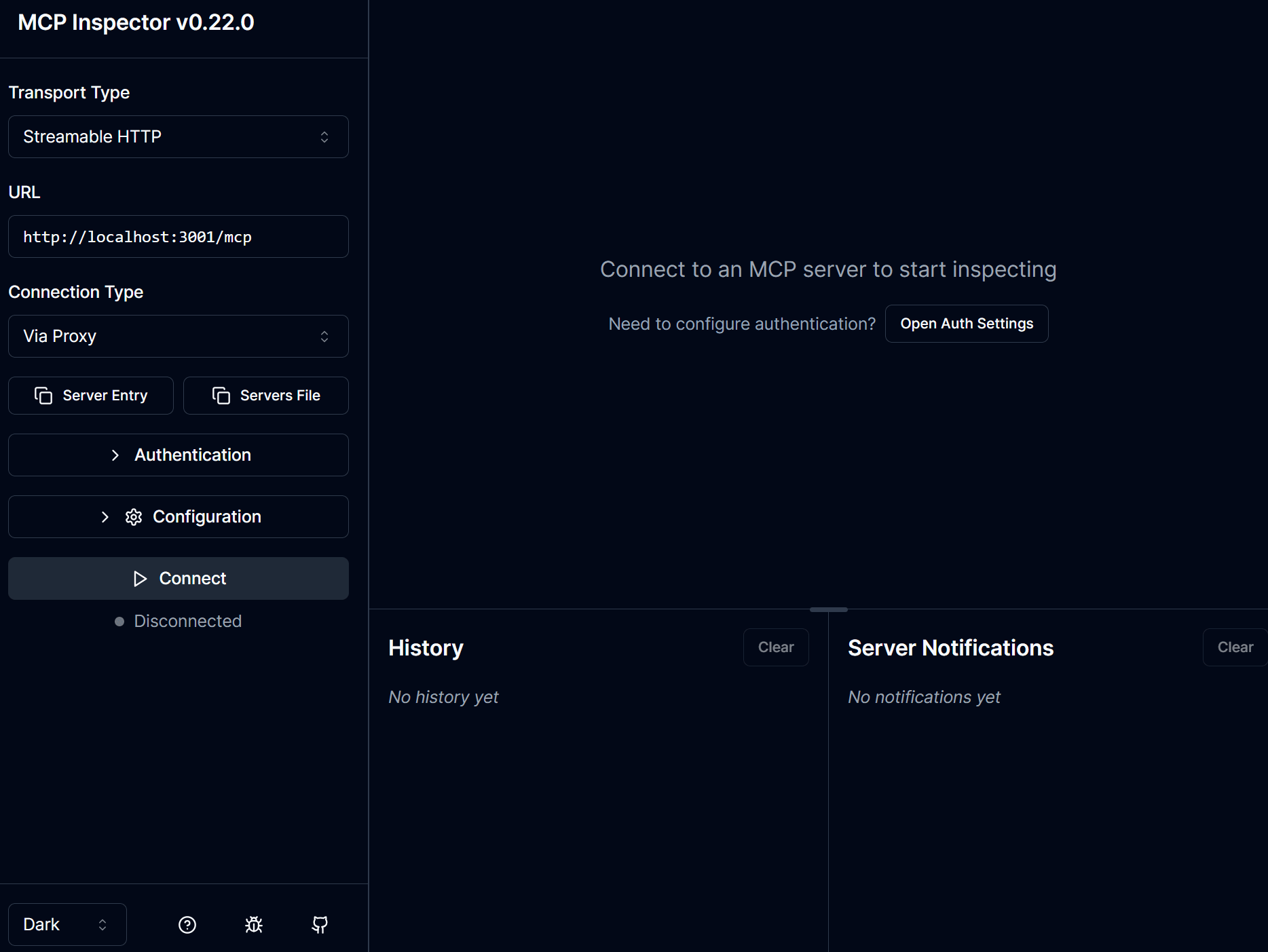
The MCP Inspector is a tool that allows you to do functional tests in the MCP Server. It is a web-based tool that allows you to inspect and interact with your server without needing an AI client such as Claude Desktop, ChatGPT or others. It connects directly to your MCP server and displays the tools, resources, and prompts it exposes. It also lets you invoke tools manually, provide input parameters, and inspect the responses returned by the server.
This is the MCP Inspector user interface (I will demonstrate how to use it on next topic):
Tip: The MCP Inspector is intended for development and debugging. In production, AI clients such as Claude Desktop, ChatGPT, or your own MCP-enabled application discover and invoke these same tools automatically based on the user's requests.
Testing the MCP Server Integration
To run the demo project, the first thing you should do, for both Stdio and Stremable HTTP approaches, is to Start SQL Server and the Web API:
cd `<add-project-path>`
docker compose up -d
Then run ProductCatalog.WebApi (it applies migrations automatically on startup):
dotnet run --project ProductCatalog.WebApiLeave that running.
In case you want a clean slate, before each run, execute the following commands after the first execution:
docker compose down -v
docker compose up -d
dotnet run --project ProductCatalog.WebApi
1. Running the Console Client
This project calls the MCP Server (specifically ProductCatalogMcpServer.Stdio), so make sure that the Web API project and the SQL on Docker are running.
Then, To run the Client project, execute
dotnet run --project ProductCatalogMcp.ConsoleClientThe following will be shown in the console:
Available tools:
- update_product_price: Updates the price of an existing product. Name and category cannot be changed after creation. - get_categories: Returns the list of valid product categories. Call this before add_product if you are not sure which category names are valid.
- search_products: Searches for products by product name or category name. The search is case-insensitive and matches partial names.
- get_products: Returns the list of all products available in the catalog.
- add_product: Adds a new product to the catalog. The category must match an existing category name (case-insensitive) — call get_categories first if unsure.
- delete_product: Deletes a product from the catalog by id.

Categories:
[{"id":2,"name":"Books"},{"id":1,"name":"Electronics"}]

Products currently in the catalog:
[{"id":1,"name":"Wireless Mouse","categoryId":1,"categoryName":"Electronics","price":29.99},{"id":2,"name":"Mechanical Keyboard","categoryId":1,"categoryName":"Electronics","price":89.99},{"id":3,"name":"The Pragmatic Programmer","categoryId":2,"categoryName":"Books","price":42.00},{"id":4,"name":"Clean Code","categoryId":2,"categoryName":"Books","price":37.50},{"id":5,"name":"Bluetooth Speaker","categoryId":1,"categoryName":"Electronics","price":45.99},{"id":6,"name":"test","categoryId":2,"categoryName":"Books","price":1.00}]

Searching for 'electronics':
[{"id":1,"name":"Wireless Mouse","categoryId":1,"categoryName":"Electronics","price":29.99},{"id":2,"name":"Mechanical Keyboard","categoryId":1,"categoryName":"Electronics","price":89.99},{"id":5,"name":"Bluetooth Speaker","categoryId":1,"categoryName":"Electronics","price":45.99}]

Adding a new product:
{"id":7,"name":"USB-C Hub","categoryId":1,"categoryName":"Electronics","price":24.99}

Updating the new product's price:
{"id":7,"name":"USB-C Hub","categoryId":1,"categoryName":"Electronics","price":29.99}

Deleting the new product to leave the catalog unchanged
The product with id 7 was deleted from the catalog.
2. Running the Stdio approach
To test the Stdio approach, after starting the SQL Server and the Web API, open a new terminal and run:
npx @modelcontextprotocol/inspector dotnet run --project ProductCatalogMcpServer.StdioThe Inspector UI will open, make sure the "Transport Type" is "STDIO" and then click on "Connect":
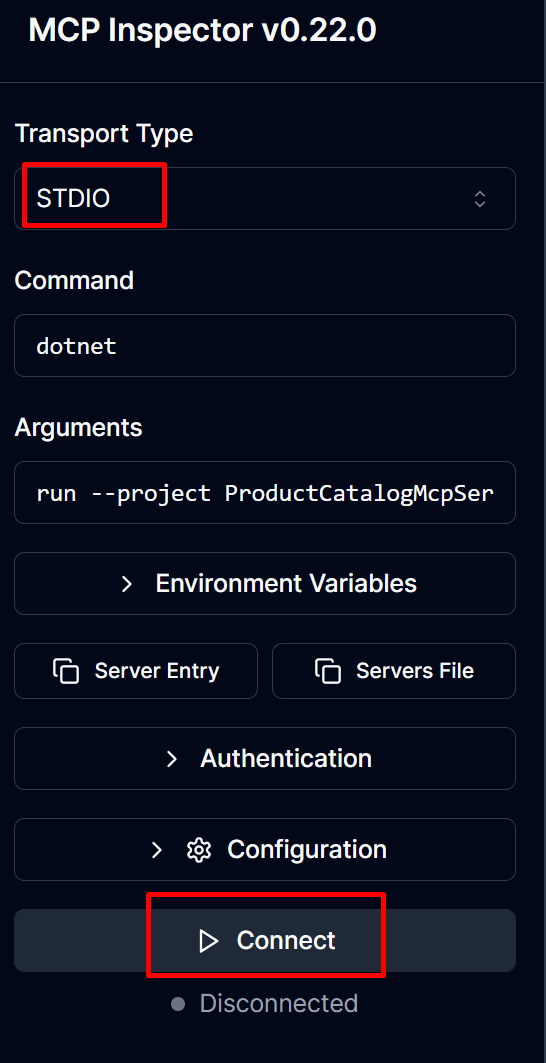
After that, click on "List tools" and the list of tools from our MCP Server will be shown:
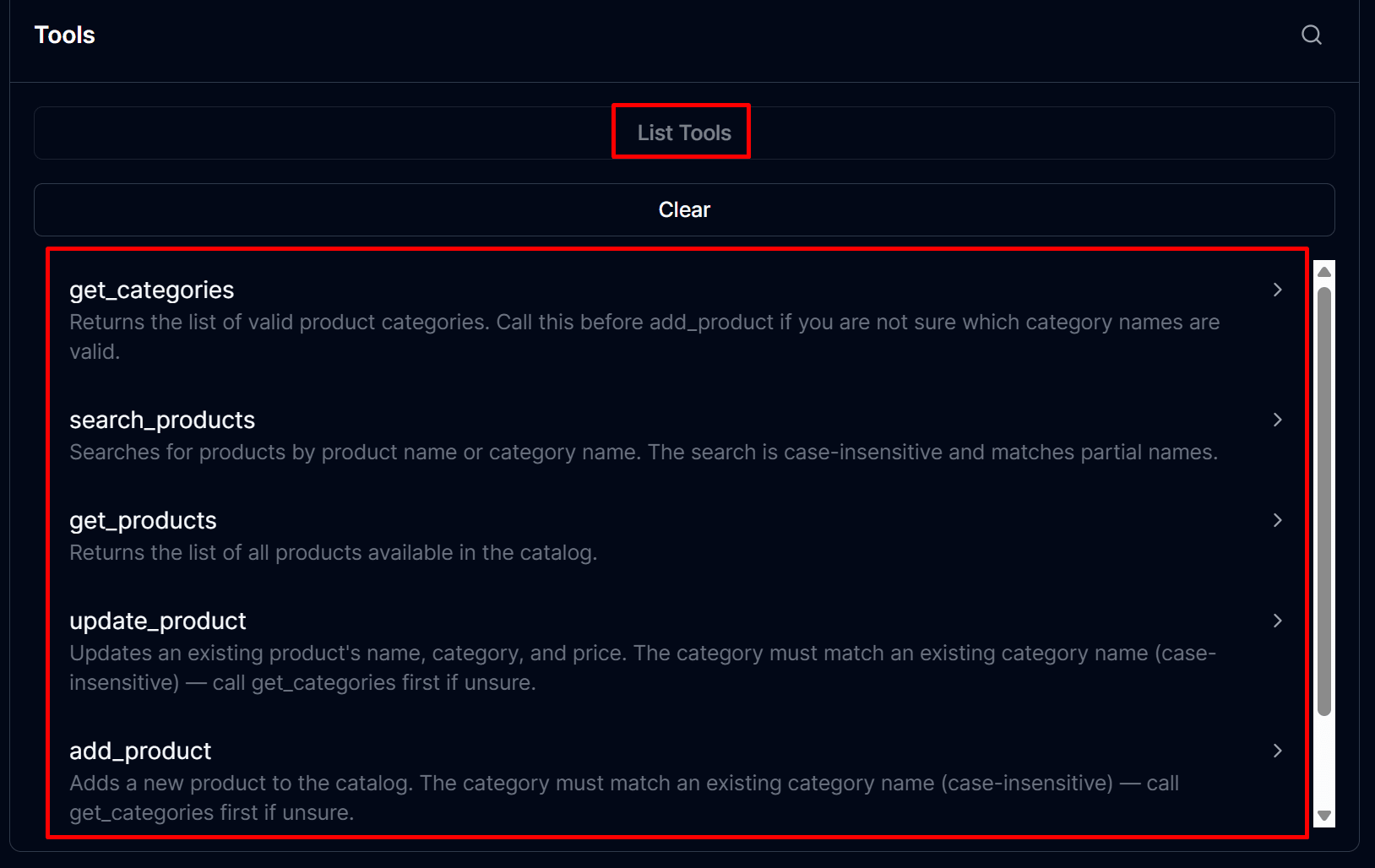
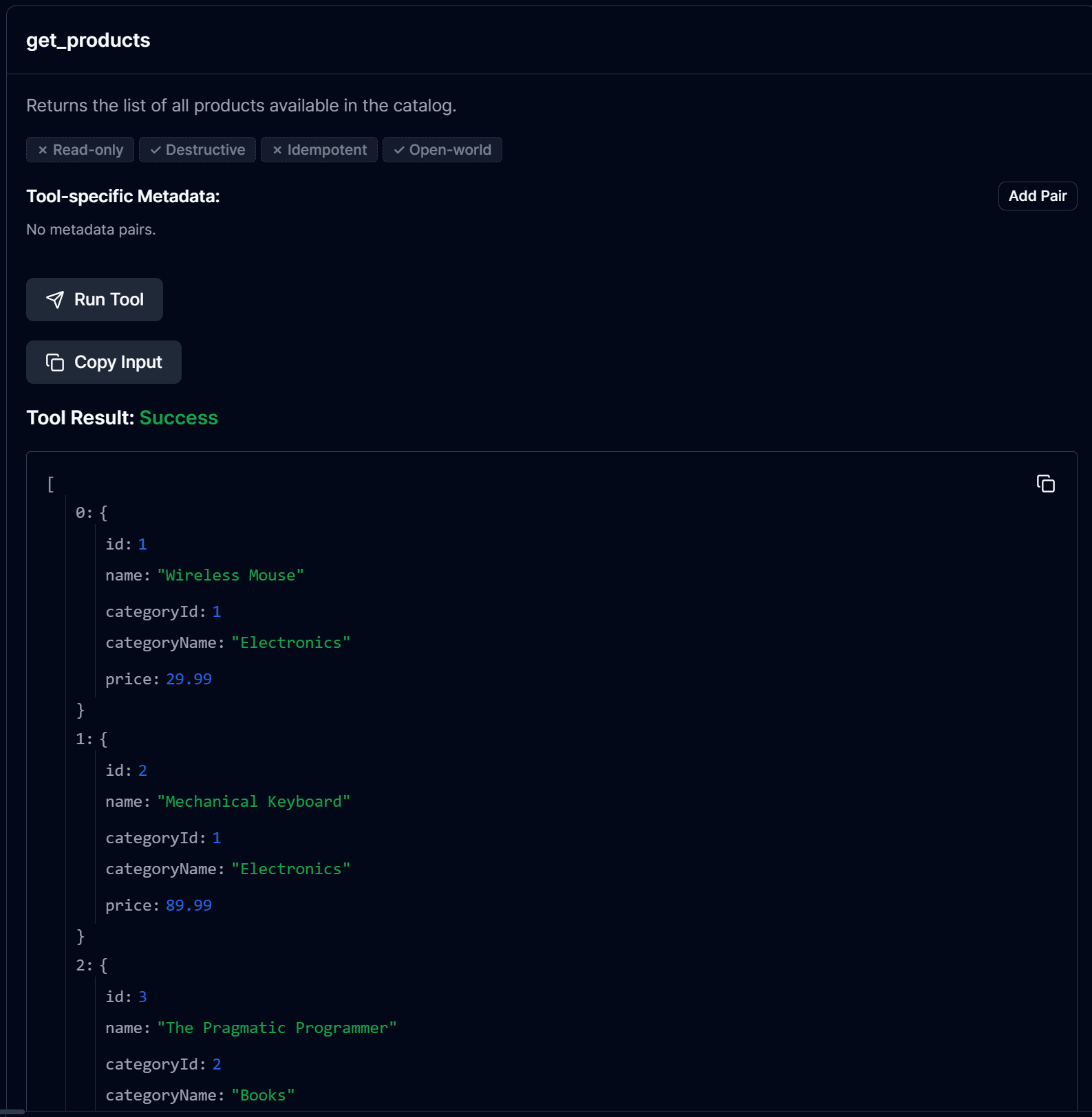
Click on any of the tools, for example, the get_products, and click on "Run Tool", and you will see the response:
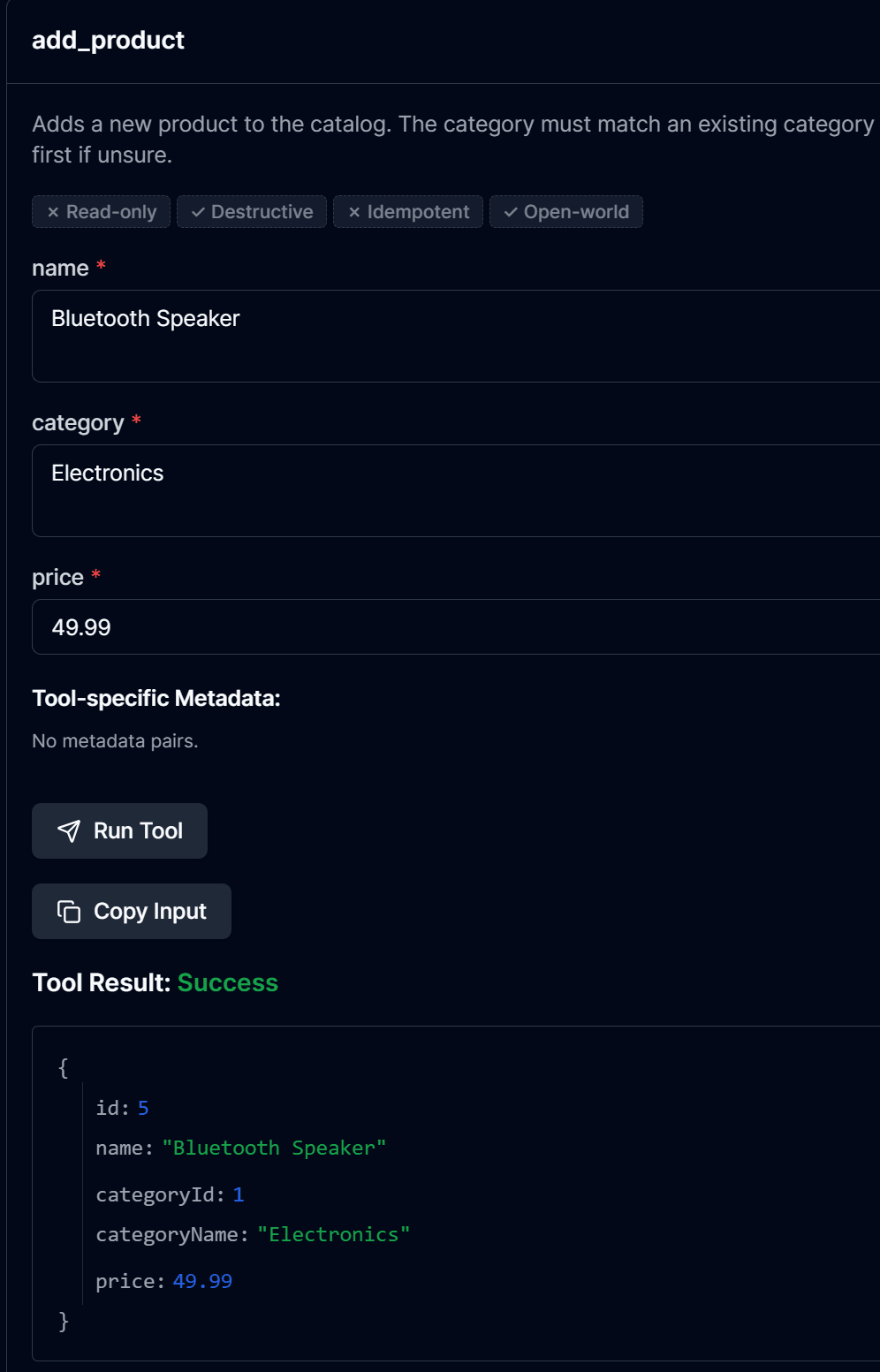
Let's add a new product now:
Let's confirm in the Database that the product was added:

3. Running the Streamable HTTP approach
In case you are running the Stdio from previous topic, stop/replace the stdio Inspector session, or just open another terminal and run:
dotnet run --project ProductCatalogMcpServer.HttpThis listens on http://localhost:3001. Then open the Inspector in a new terminal:
npx @modelcontextprotocol/inspectorAs /mcp is now protected by the API key middleware, add a custom header in the Inspector's "Authentication" section: name X-Api-Key, value 62bc33a6-8a7e-4c0a-86c5-244f7a2c6e79 (matching the ApiKeys list in ProductCatalogMcpServer.Http's appsettings.json).
In the MCP Inspector UI, select the Transport Type "Streamable HTTP", make sure the URL is http://localhost:3001/mcp, confirm the X-Api-Key custom header is enabled, then click on Connect:
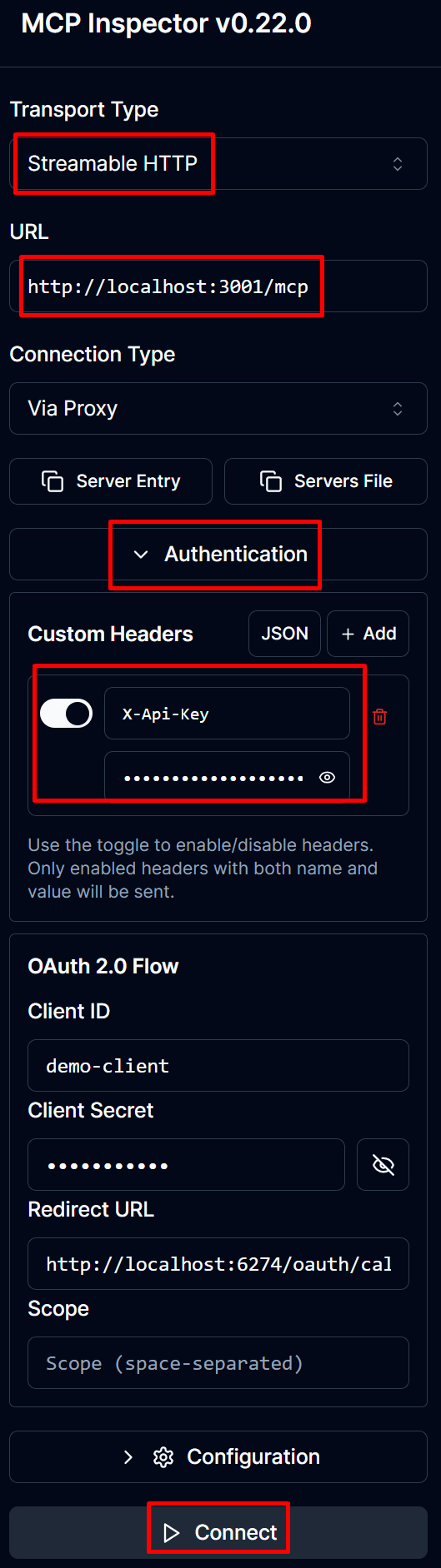
In case the API Key is not provided, it will show an error message The 'X-Api-Key' header was not provided. when you try to connect.
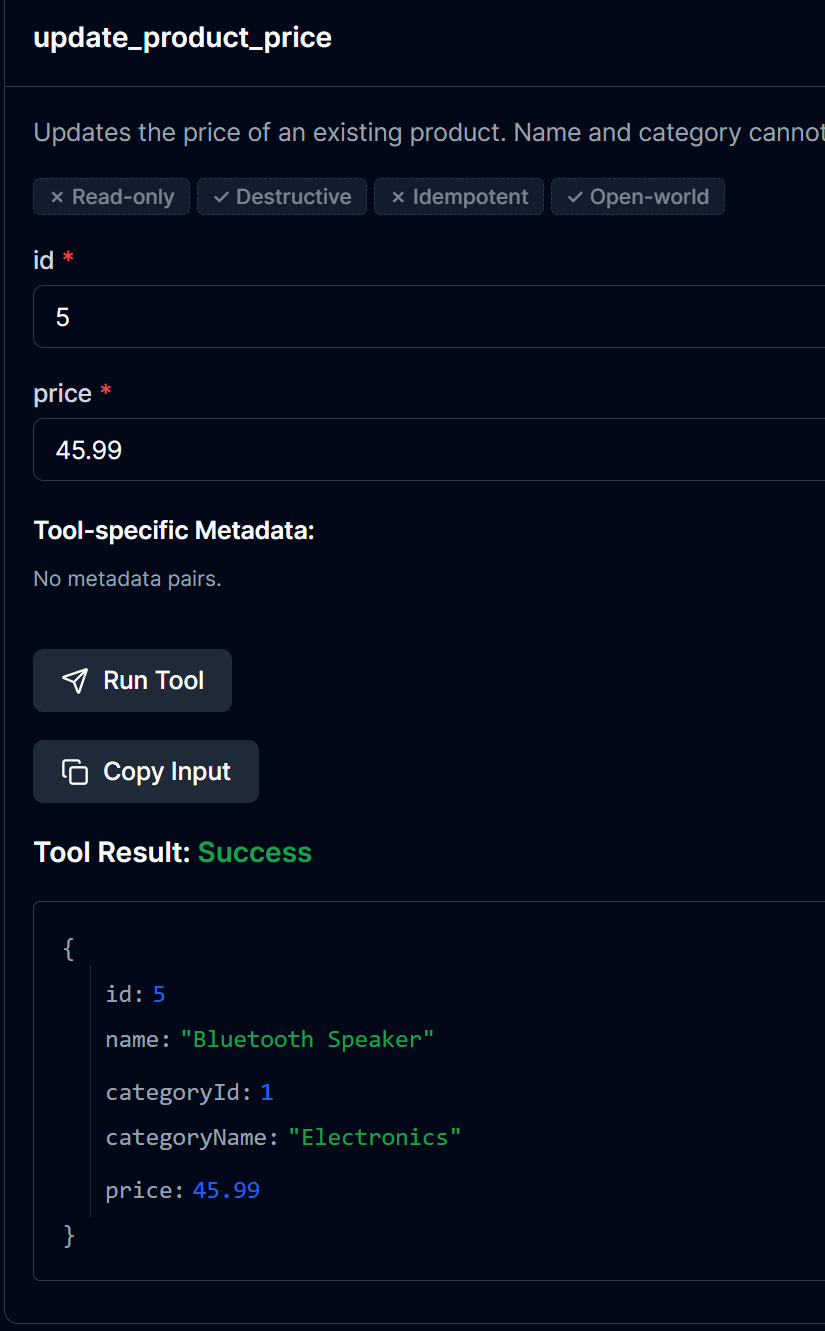
Now let's update the Product's price:
Let's confirm by checking the Database:
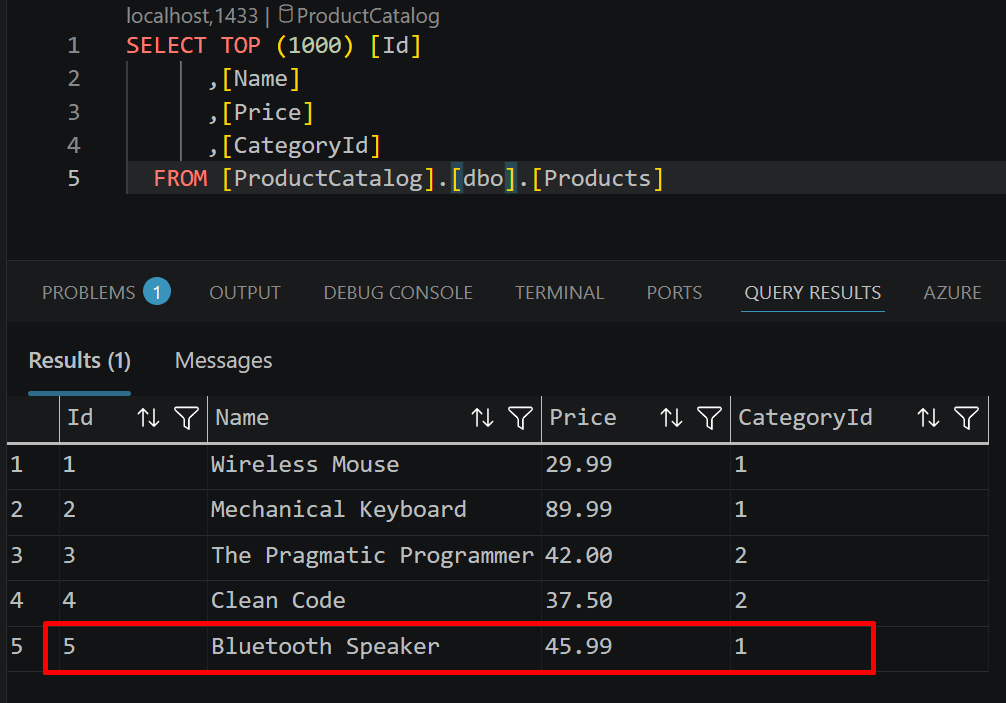
Note: don't run ProductCatalogMcpServer.Stdio and .Http at the same time unless you want to; they're independent, both talk to the same ProductCatalog.WebApi, so you'll see the same data either way.
4. Using the MCP Server in Claude Desktop
To use the MCP server with a real LLM, you can configure it in Claude Desktop, for that, open the file claude_desktop_config.json (on Windows it is located at %APPDATA%\Claude\, and on macOS at ~/Library/Application Support/Claude/) and add the server configuration:
{
  "mcpServers": {
    "productcatalog": {
      "command": "dotnet",
      "args": [
        "run",
        "--project",
        "C:\\<Add-Path-to>\\ProductCatalogMcpDemo\\ProductCatalogMcpServer.Stdio"
      ]
    }
  }
}
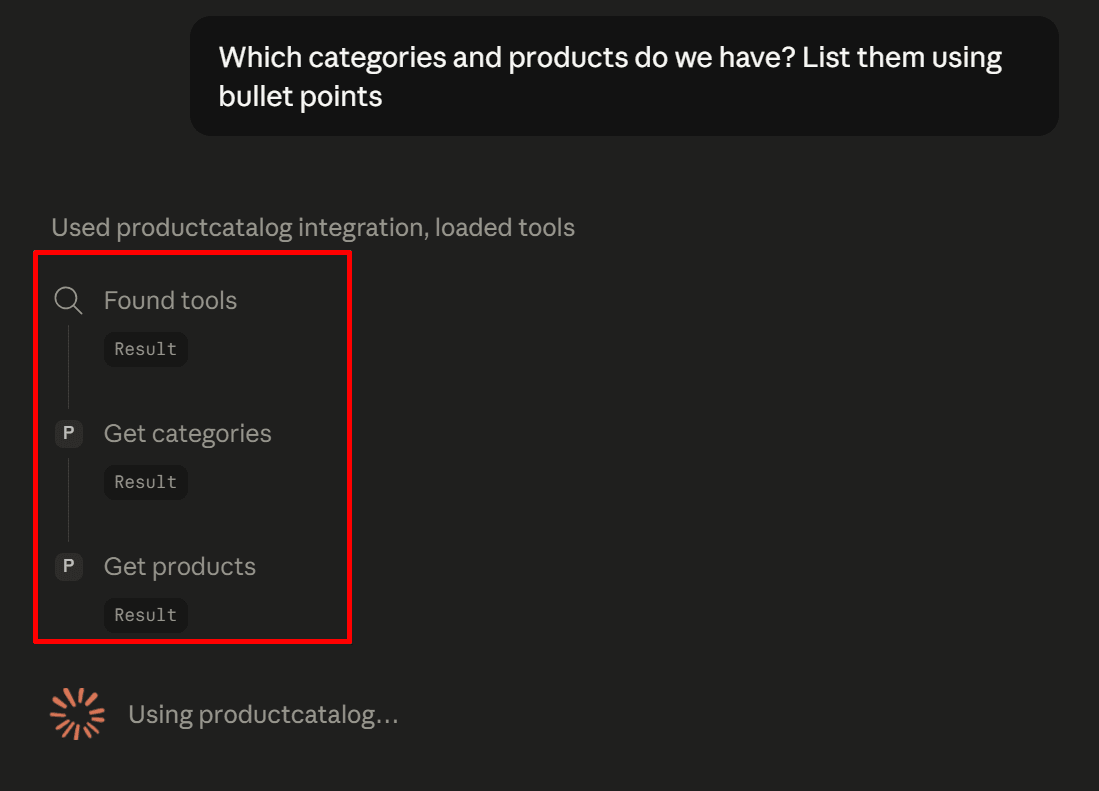
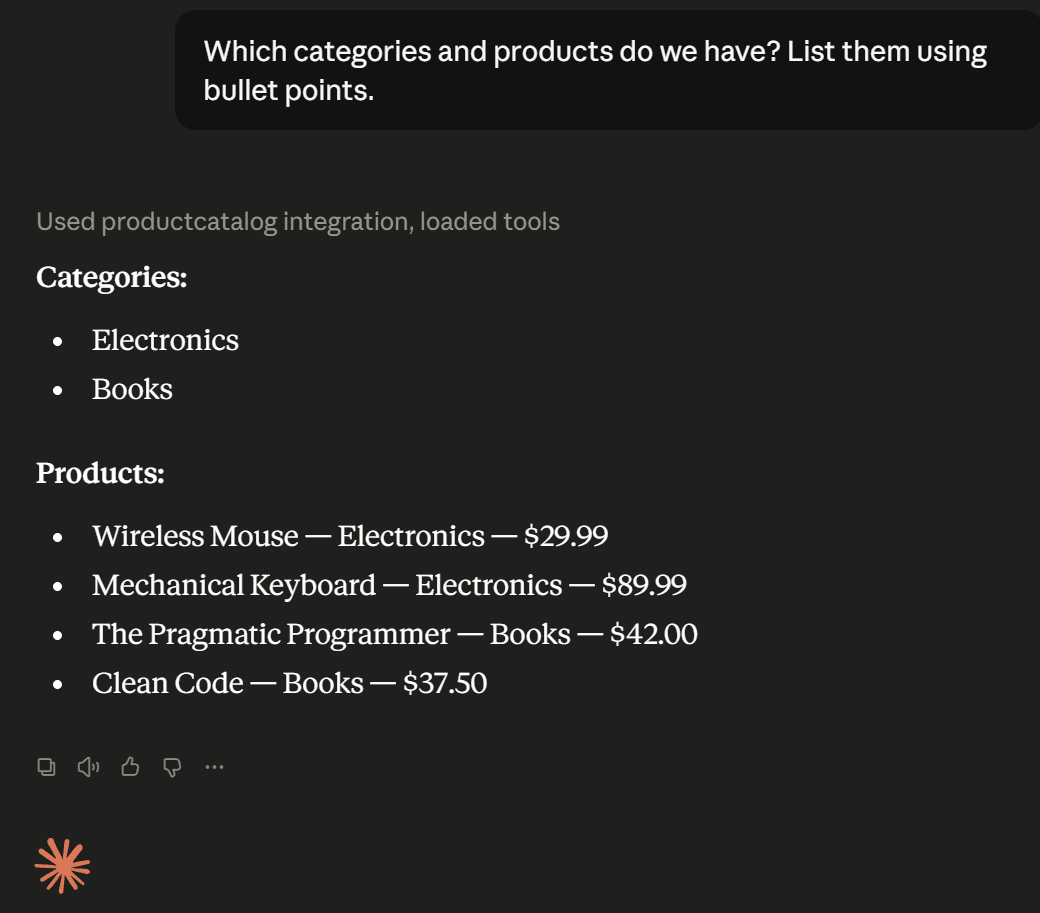
With SQL Server and ProductCatalog.WebApi still running, restart Claude Desktop, and the productcatalog server will be available, and you can ask questions such as "Which categories and products do we have? List them using bullet points". Note that after the prompt is sent, we can see the tools are bing called:
This is the result:
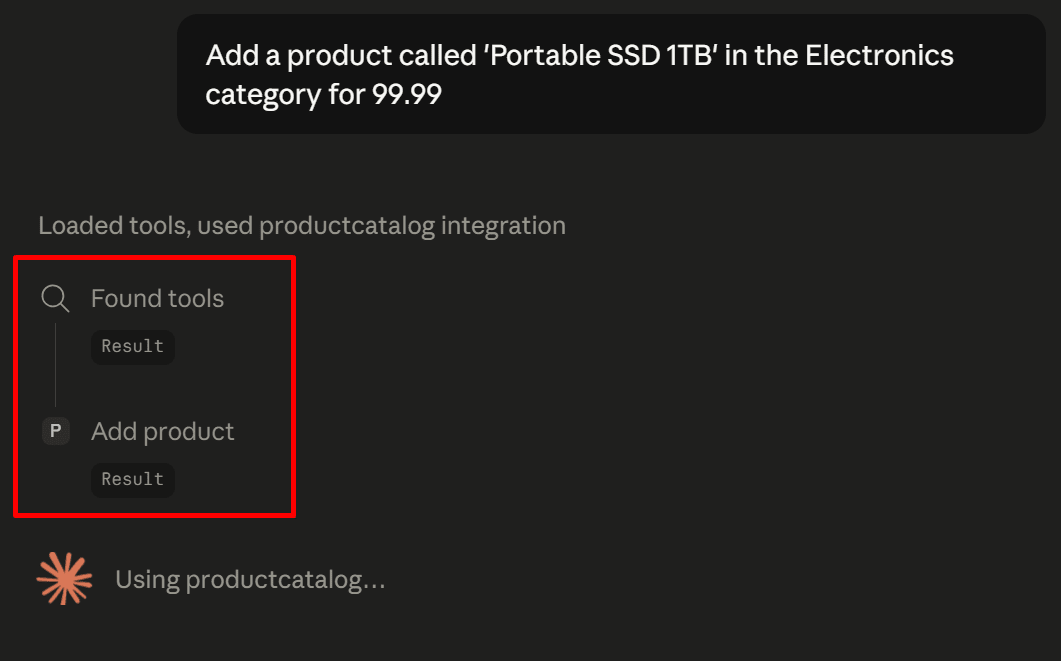
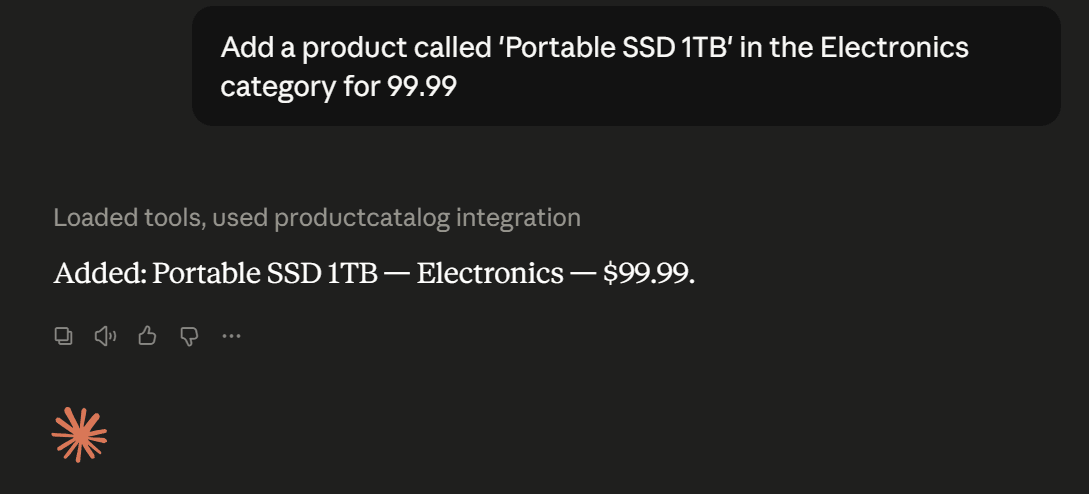
Let's now ask to add a new product, note that the add_product tool will be called:
And the product will be added:
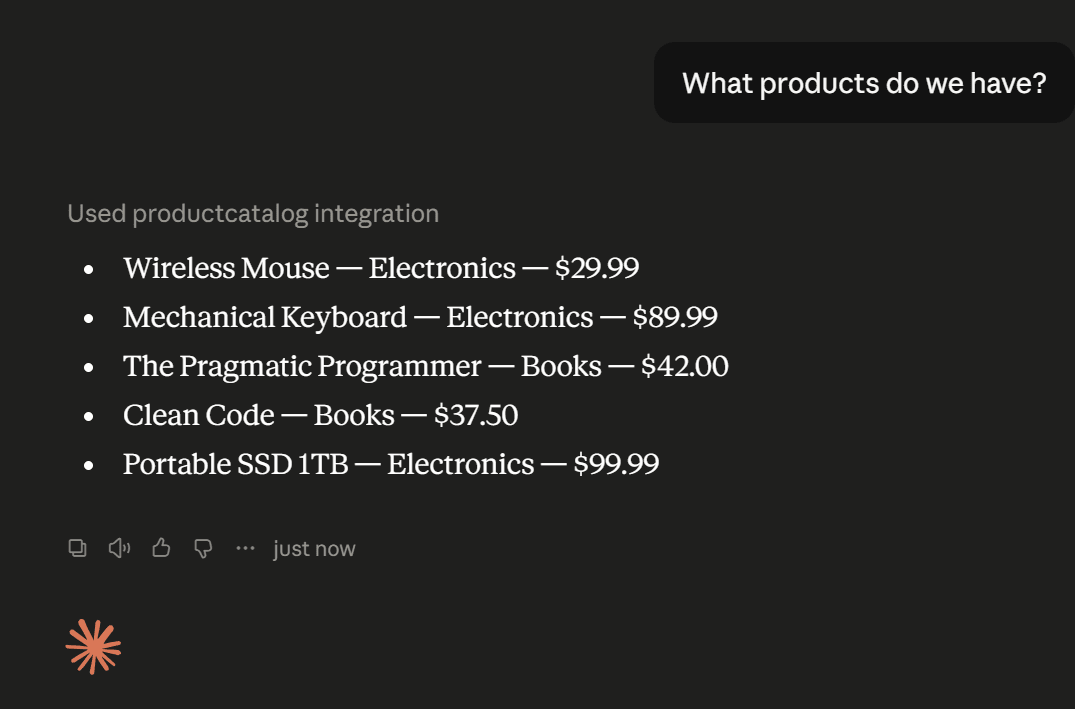
Now let's ask for the products we have and see the new product in the list (What products do we have?):
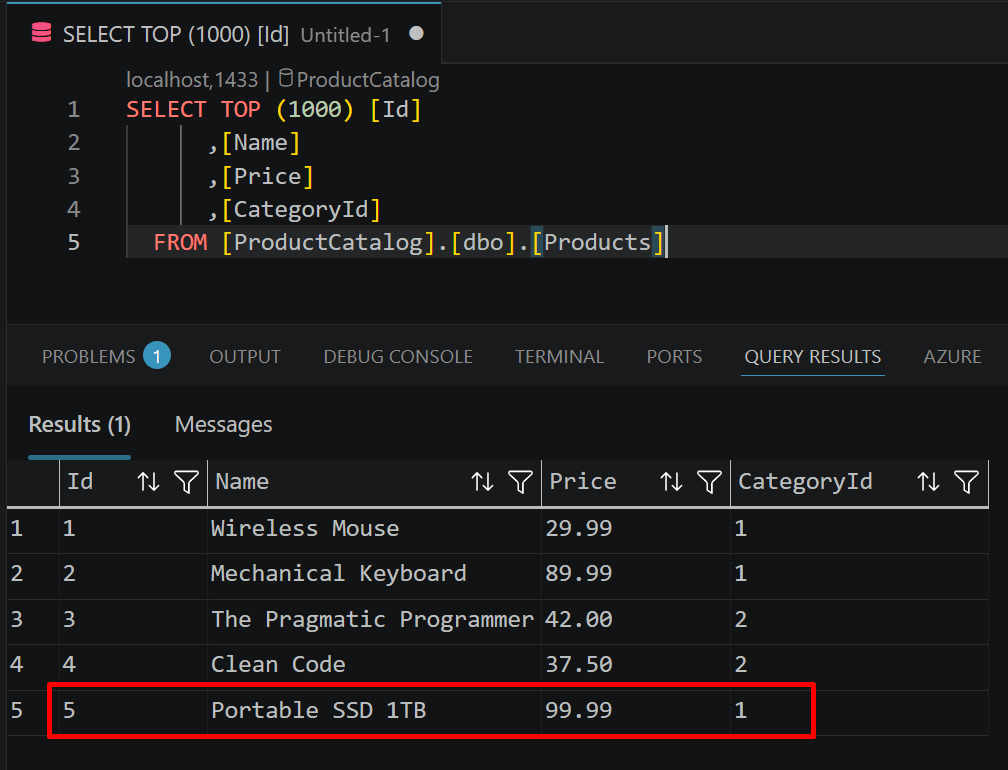
Querying directly in the database, we can see that the product was really added:
If the user tries to do an operation that is not supported, for example, update a product name, it will not be possible (as expected):
Conclusion
The Model Context Protocol (MCP) standardises how AI applications communicate with external tools and data sources, eliminating the need for custom integrations between each AI application and each system. As presented, the MCP C# SDK makes the building of MCP servers in .NET quite simple, you register the server in the dependency injection container, choose a transport, and expose your tools with the [McpServerToolType] and [McpServerTool] attributes.
Building an MCP server is particularly useful when you want to make existing business capabilities available to AI applications while maintaining full control over security, permissions, and the operations that can be performed. The MCP Server does not replace your existing APIs or business logic, instead, it provides a standard AI-facing interface over those systems, allowing any compatible AI application to discover and invoke the capabilities you choose to expose.
For local integrations, the Stdio transport is typically the best choice, whereas Streamable HTTP is more suitable when the MCP server is deployed remotely and needs to be accessed over a network.
By separating transport, protocol, and business logic, MCP allows existing applications to become AI-enabled without changing their underlying architecture. Whether your data comes from REST APIs, databases, cloud services, or internal systems, an MCP server provides a standard interface that any compatible AI application can consume.
This is the link for the project on GitHub: https://github.com/henriquesd/ProductCatalogMcpDemo
If you like this demo, I kindly ask you to give a ⭐ in the repository.
Thanks for reading!
References
Model Context Protocol - Official Documentation
.NET AI - MCP - Microsoft Docs
MCP Authorization Specification
.NET AI - MCP Client/Server - Microsoft Docs
MCP C# SDK - GitHub Repository
ModelContextProtocol - NuGet Package
Build a Model Context Protocol (MCP) server in C# - Microsoft Learn