What is Retrieval-Augmented Generation (RAG)
Retrieval-Augmented Generation (RAG) is a technique that extends the capabilities of Large Language Models (LLMs) by retrieving relevant information from an external knowledge base and injecting it into the prompt before the model generates a response. Instead of relying solely on what it learned during training, the model can answer questions using external or private information available at query time. In this article, I present how RAG works and demonstrate how to implement it in a .NET Web API.
Problems Solved by RAG
RAG addresses three common problems/limitations of LLMs:
- Knowledge cutoff: LLMs are trained on data available up to a specific point in time and do not have access to newer information. Out of the box, LLMs can not access new information beyond its training data.
- Hallucination: When an LLM lacks the necessary information, it may generate plausible-sounding but incorrect answers.
- Private or domain-specific data: LLMs do not have access to your internal systems, documents, or proprietary content.
RAG solves these problems by retrieving relevant information from an external knowledge base and providing it to the model as context before generating a response. For example, after a user submits a prompt, before the LLM generates a response, a retrieval step searches your knowledge base for the most relevant information and includes it as context, the LLM then uses that information to produce a grounded, accurate answer. Without RAG, when a user sends a prompt, the model relies exclusively on their training data, which may be outdated, incomplete, or unaware of your private or domain-specific information.
Note that RAG does not retrain or fine-tune the LLM. It supplies relevant information at inference time, allowing the model to answer questions using external knowledge without changing its parameters.
How RAG Works
RAG consists of two main phases: the Indexing Phase and the Querying Phase.
Indexing Phase
The indexing phase prepares the knowledge base for efficient semantic search and is typically performed only once and repeated only when the underlying data changes. During this phase, documents are loaded, split into chunks, converted into embeddings, and stored in a vector database. Once indexing is complete, only the user’s query is embedded at runtime. The stored embeddings are reused for all future searches.
This is an illustration of the Indexing flow:
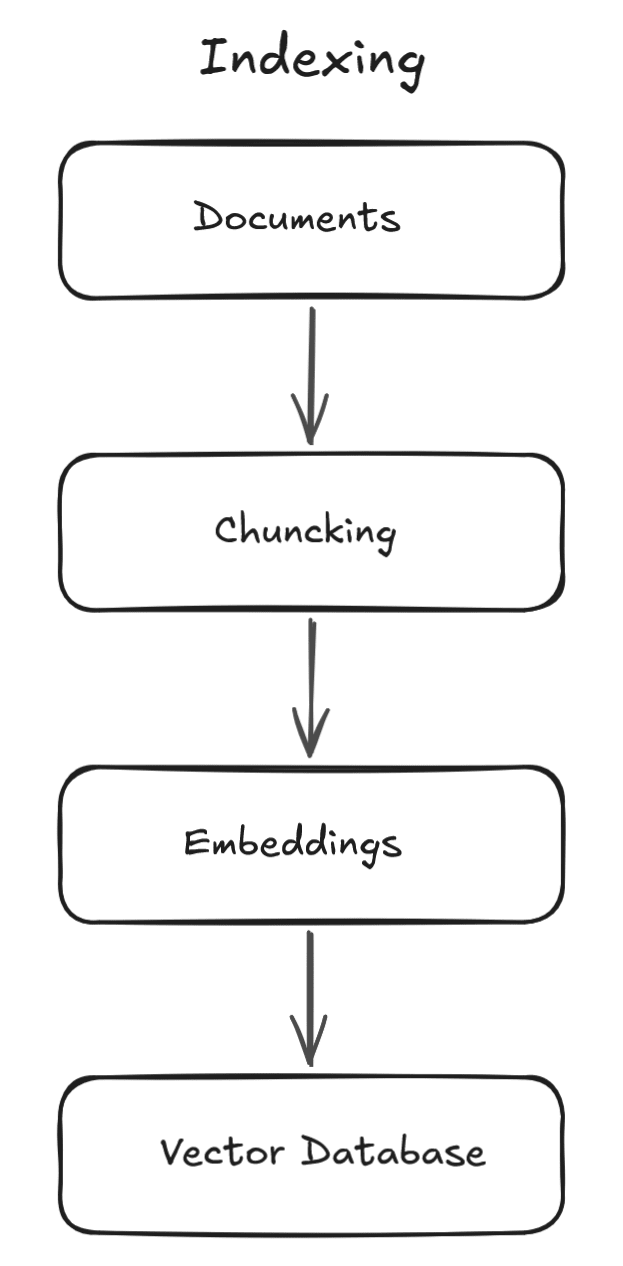
The Indexing phase consists of the following steps:
- Load documents: Data is collected from one or more sources, such as PDFs, Word documents, CSV files, websites, SQL databases, APIs, internal knowledge bases, etc.
- Chunk: The content of each document is extracted and split into smaller pieces called chunks. Smaller chunks generally produce more accurate search results and fit within the token limits of embedding models. Chunking is necessary because embedding models and vector search work best on small, semantically focused pieces of text. However, if chunks are too small, context is lost. If they are too large, retrieval becomes noisy.
- Embedding: Each chunk is converted into a high-dimensional numerical vector called an embedding, which captures the semantic meaning of the text. Chunks with similar meanings are represented by vectors that are close together in the embedding space, allowing semantic searches instead of simple keyword matching.
- Store: Each chunk, its embedding, and its metadata (such as the source document, document name, page number, file type, tags, etc) are stored in a vector database, which is optimised for semantic similarity search. During retrieval, metadata can be used to filter results before similarity search.
Although embeddings are represented as vectors of floating-point numbers, developers rarely work with the vectors directly. Instead, embedding models generate them automatically, and vector databases handle the similarity calculations internally.
Overlap
To preserve context, chunks are often created with overlap, meaning that a small portion of one chunk is repeated in the next. Without overlap, important information may be split across chunk boundaries, causing retrieval to miss relevant context. By repeating a few sentences or tokens between consecutive chunks, each chunk becomes more self-contained, improving both retrieval accuracy and the quality of the generated responses.
Overlapping chunks are an important detail in RAG implementations. When a relevant piece of information spans across a chunk boundary, having overlap ensures the context is not lost, and both adjacent chunks contain enough surrounding text to be meaningful on their own.
Consider a scenario where there is no overlap configured and a document is split into two chunks:
// Chunk 1:
Customers who are subscribed to the Premium plan receive a 20% discount on all yearly renewals.
The discount is applied automatically at checkout.

// Chunk 2:
The discount only applies if the customer has been subscribed for more than 12 months.
It does not apply to monthly subscriptions or trial accounts.
Now imagine a user asks: "What discount does a Premium customer get on renewal?". A vector search might retrieve only Chunk 1 because it strongly matches “Premium”, “discount”, and “renewal”. The problem is that Chunk 1 suggests a simple rule that premium customers get a 20% discount on renewal. However, this is incomplete and potentially misleading, because it ignores an important condition found in Chunk 2: the discount only applies after more than 12 months of subscription. In a real-world system, this missing context could lead to incorrect pricing explanations or even inaccurate quotes.
To reduce the risk of losing important context between chunks, we can use overlap between consecutive chunks, and specify the number of tokens you want to be overlapped. This ensures that information spanning a boundary is repeated, preserving semantic continuity. When this is configured, using the same scenario mentioned before, we would have something like this:
// Chunk 1:
Customers who are subscribed to the Premium plan receive a 20% discount on all yearly renewals.
The discount is applied automatically at checkout.
However, the discount only applies if the customer has been subscribed for more than 12 months.

// Chunk 2:
The discount only applies if the customer has been subscribed for more than 12 months.
It does not apply to monthly subscriptions or trial accounts.
Now, even if only one chunk is retrieved, there is a much higher chance that critical conditions remain attached to the main rule. This reduces the risk of incomplete context and improves the accuracy of downstream LLM responses.
Querying Phase
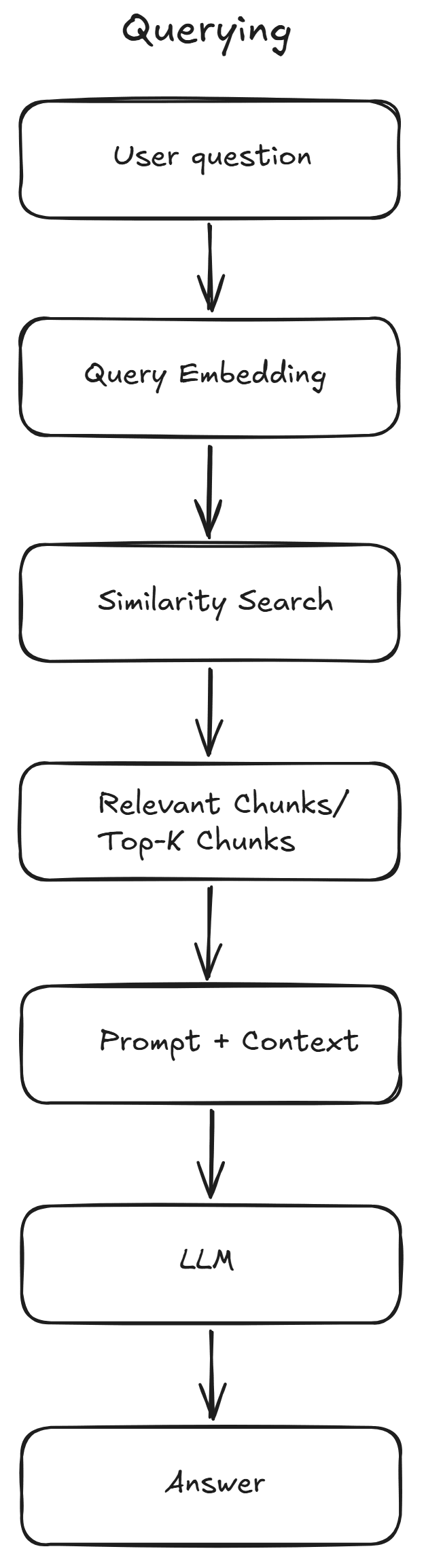
Whenever a user submits a question, the following steps occur:
- Embed the query: The user's question is converted into an embedding using the same embedding model that was used during indexing. The query and document embeddings must be generated using the same embedding model so that they exist in the same semantic space for similarity search to produce meaningful results, otherwise, similarity comparisons become meaningless.
- Similarity/semantic search: The query embedding is compared with the stored embeddings in the vector database using similarity metrics such as cosine similarity or dot product. The vector database then retrieves the Top-K most relevant chunks (for example, the five closest matches), which will later be used as additional context for the LLM.
- Augment the prompt: The retrieved chunks are injected into the prompt as additional context.
- Generate the response: The LLM generates an answer based on both the user's question and the retrieved context, producing a response grounded in your own data rather than relying solely on its training.
This is an illustration of the Querying flow:
Production Optimisations
There are some considerations I want to mention, for a production environment:
- Choosing an appropriate Top-K value is a trade-off. Retrieving too few chunks may omit important context, while retrieving too many increases token usage and can introduce irrelevant information into the prompt.
- In production systems, semantic search is often combined with traditional keyword search, a technique known as Hybrid Search. This improves retrieval accuracy, especially for queries containing exact names, product codes, identifiers, or error messages, where keyword matching complements semantic similarity.
- Some RAG systems also apply a reranking step after the initial retrieval. A reranking model evaluates the retrieved chunks again and reorders them based on their relevance to the user's query before they are sent to the LLM. This helps improve answer quality by providing more relevant context.
- Additional techniques such as metadata filtering, chunk tuning, caching, and evaluation to improve retrieval quality and scalability are also commonly encountered in RAG systems.
Real-world example
Consider the scenario where a user submits a prompt asking about some specific information regarding the company's profit. When the user submits the question, it is also converted into an embedding. The vector database performs a similarity search to find the chunks whose embeddings are closest to the question's embedding. These retrieved chunks are then added to the prompt as context, allowing the LLM to generate an accurate, up-to-date answer grounded in the company's own data.
For example, let’s say a user asks how much profit the company made in 2026. This is not public information, so to answer it correctly, the model needs access to the company’s internal database or documents where this data is stored. This is what happens:
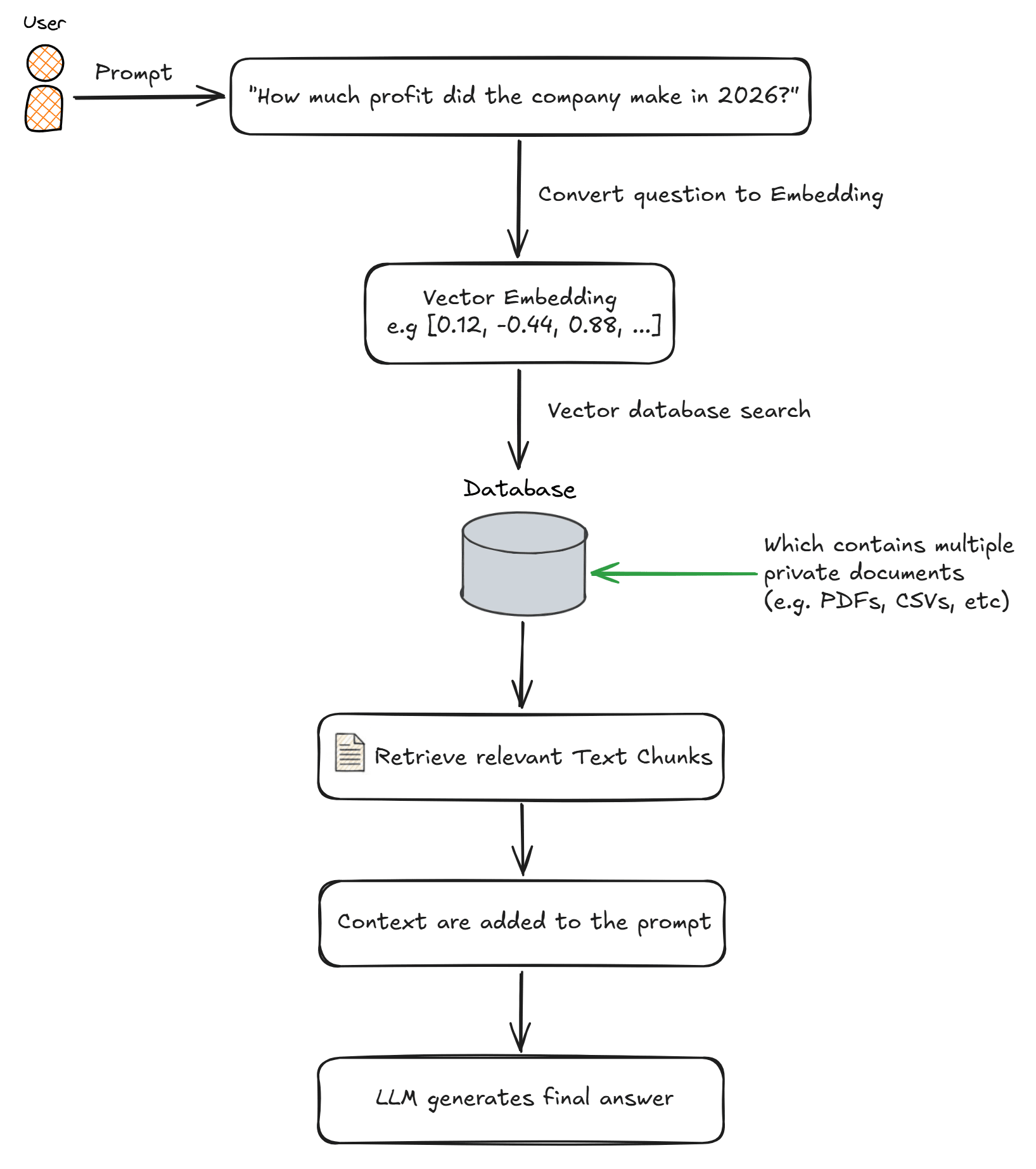
- When the user asks
“How much profit did the company make in 2026?”, the question is first converted into a vector representation (embedding), e.g.:[0.12, -0.44, 0.88, ...]. - The system then searches a vector database containing embeddings of company documents (such as financial reports, internal dashboards, and accounting records). It compares the query embedding against the stored document embeddings and retrieves the chunks whose embeddings are most similar.
- The top relevant chunks are selected and added to the prompt. Example:
Context: Company profit in 2026 was €3.2M according to internal report Q4. Question: How much profit did the company make in 2026? - The LLM receives the original question and the retrieved context. it does NOT guess the answer, instead, it grounds the answer in the provided data. Final output example would be
“The company made €3.2 million profit in 2026.”
Without RAG, this question would likely be answered incorrectly or hallucinated, since the model has no access to internal financial data.
Demo Project
Now that the concepts behind RAG were explained, let's do the implementation of RAG in a project; for that, I created a .NET 10 Web API. The project indexes a small knowledge base, stores embeddings in an in-memory vector store, retrieves relevant document chunks through semantic search, and uses Google Gemini to generate grounded answers.
For the knowledge base, to keep things simple, this demo does not use a real external vector database. Instead, it uses an in-memory vector store (InMemoryVectorStore) to simulate vector database behaviour. The raw data is defined as a simple Dictionary<string, string> containing documents about various .NET topics. During application startup, these documents are loaded by the KnowledgeBaseSeeder, split into chunks, converted into embeddings, and then stored as DocumentChunk objects inside the in-memory vector store.
When a request is sent, the API answers questions about those topics using semantic search combined with LLM generation.
This demo is using an in-memory implementation for demonstration purposes. In production, you would use a dedicated vector database such as Azure AI Search, Qdrant, Weaviate, Pinecone, Milvus and pgvector for PostgreSQL, which are optimised for large-scale similarity search and persistence, and consider adding metadata filtering, re-ranking, and evaluation steps to improve retrieval quality.
Setting Up the Project
In this demo, I'm using three packages:
Microsoft.Extensions.AI.OpenAI, which provides a common abstraction layer (IChatClient and IEmbeddingGenerator) for OpenAI-compatible models. This allows switching between providers such as OpenAI, Azure OpenAI, Google Gemini (via its OpenAI-compatible endpoint), or any other OpenAI-compatible service with minimal code changes.Microsoft.SemanticKernel.Connectors.InMemory, which provides an in-memory implementation of a vector store. It allows storing document embeddings and performing vector similarity searches without requiring an external vector database (ideal for demos and local development). Note that this package is currently in preview. It also brings inMicrosoft.Extensions.VectorDataas a transitive dependency, which is where the vector store abstractions used in this demo come from, such as VectorStoreCollection and the [VectorStoreKey], [VectorStoreData], and [VectorStoreVector] attributes.Microsoft.SemanticKernel.Core, which provides the TextChunker helper used to split documents into smaller chunks before generating embeddings. TextChunker is currently marked as experimental (SKEXP0050), so the project suppresses this diagnostic in the .csproj file:
<PropertyGroup>
  <!-- ... -->
  <NoWarn>$(NoWarn);SKEXP0050</NoWarn>
</PropertyGroup>
For this demo, I'm using Gemini API. If you want to run this demo or follow along, you will need to create an API Key at https://aistudio.google.com/.
How the Demo Works
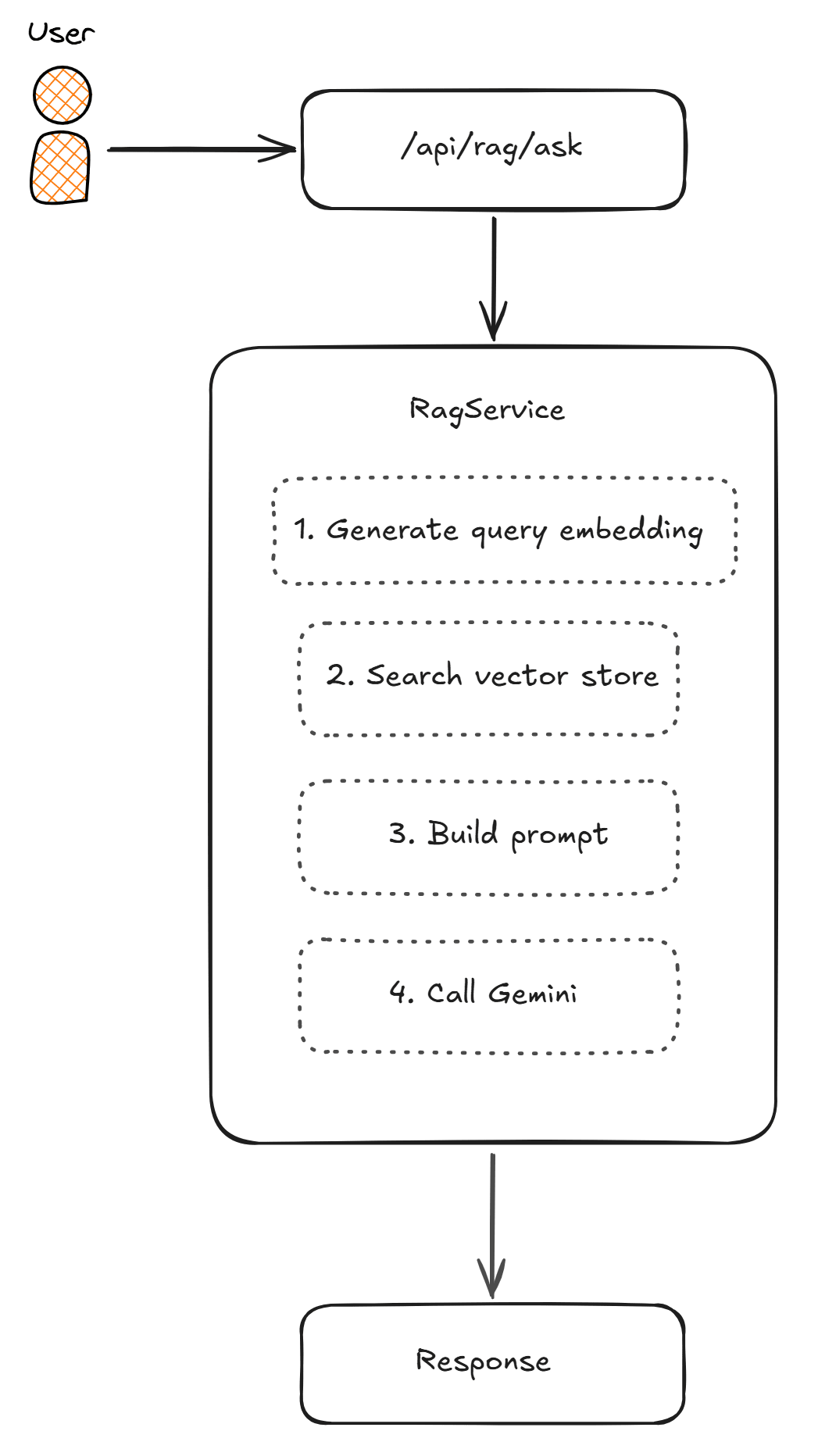
The application follows a typical RAG pipeline:
- During startup, a small built-in knowledge base with five .NET topics is split into chunks, each chunk is converted into an embedding (a numeric vector capturing its meaning) via Gemini, and stored in memory.
- Query time: when a POST request is sent to the
/api/rag/askendpoint, the user's question is embedded using the same embedding model. That vector is compared against every stored document chunk using cosine similarity, and the most relevant chunks are retrieved. - Response generation: the retrieved chunks are injected into the prompt as "context", allowing the Gemini chat model to answer the question based only on the retrieved content. In the response, its returned the answer and the chunks it used.
Below you can see an example of the application flow:
Project Structure
The project is organized into a few small components, each responsible for one part of the RAG pipeline.
Configuration files
In appsettings.json, we have the settings where we can add the API Key and define some settings for the LLM:
{
  "Gemini": {
    "ApiKey": "<Add-Api-Key>",
    "ChatModel": "gemini-2.5-flash-lite",
    "EmbeddingModel": "gemini-embedding-001",
    "Endpoint": "https://generativelanguage.googleapis.com/v1beta/openai/"
  },
  // ...
}
The DependencyInjectionConfig class registers all required services in the dependency injection container. It loads the Gemini configuration from appsettings.json, creates the chat client, configures the embedding generator, and registers the application's services.
public static class DependencyInjectionConfig
{
    public static IServiceCollection ResolveDependencies(
        this IServiceCollection services, IConfiguration configuration)
    {
        var apiKey = configuration["Gemini:ApiKey"] ?? throw new InvalidOperationException("Gemini API key not found. Set the 'Gemini:ApiKey' user secret or environment variable.");
        var chatModel = configuration["Gemini:ChatModel"] ?? throw new InvalidOperationException("Gemini:ChatModel not found in configuration.");
        var embeddingModel = configuration["Gemini:EmbeddingModel"] ?? throw new InvalidOperationException("Gemini:EmbeddingModel not found in configuration.");
        var endpoint = configuration["Gemini:Endpoint"] ?? throw new InvalidOperationException("Gemini:Endpoint not found in configuration.");

        var openAiClient = new OpenAIClient(
            new ApiKeyCredential(apiKey),
            new OpenAIClientOptions
            {
                Endpoint = new Uri(endpoint)
            });

        services.AddSingleton<IChatClient>(
            openAiClient.GetChatClient(chatModel).AsIChatClient());

        services.AddSingleton<IEmbeddingGenerator<string, Embedding<float>>>(
            openAiClient.GetEmbeddingClient(embeddingModel).AsIEmbeddingGenerator());

        var vectorStore = new InMemoryVectorStore();
        var collection = vectorStore.GetCollection<string, DocumentChunk>("knowledge-base");

        services.AddSingleton<VectorStoreCollection<string, DocumentChunk>>(collection);

        services.AddSingleton<EmbeddingService>();
        services.AddSingleton<RagService>();
        services.AddTransient<KnowledgeBaseSeeder>();

        return services;
    }
}
The KnowledgeBaseSeeder class populates the vector store during application startup by loading the knowledge base, splitting documents into chunks, generating embeddings, and storing everything in memory.
public class KnowledgeBaseSeeder
{
    private readonly EmbeddingService _embeddingService;
    private readonly VectorStoreCollection<string, DocumentChunk> _collection;
    private readonly ILogger<KnowledgeBaseSeeder> _logger;

    public KnowledgeBaseSeeder(
        EmbeddingService embeddingService,
        VectorStoreCollection<string, DocumentChunk> collection,
        ILogger<KnowledgeBaseSeeder> logger)
    {
        _embeddingService = embeddingService;
        _collection = collection;
        _logger = logger;
    }

    public async Task SeedAsync()
    {
        _logger.LogInformation("Indexing knowledge base...");

        await _collection.EnsureCollectionExistsAsync();

        var total = 0;
        var documents = KnowledgeBase.GetDocuments();
        foreach (var (source, content) in documents)
        {
            var lines = TextChunker.SplitPlainTextLines(content, maxTokensPerLine: 60);
            var chunks = TextChunker.SplitPlainTextParagraphs(lines, maxTokensPerParagraph: 200, overlapTokens: 40);

            var embeddedChunks = await _embeddingService.EmbedChunksAsync(chunks, source);

            await _collection.UpsertAsync(embeddedChunks);

            total += chunks.Count;
            _logger.LogInformation("Indexed '{Source}': {Count} chunk(s)", source, chunks.Count);
        }

        _logger.LogInformation("Knowledge base ready. Total chunks: {Count}", total);
    }
}
Knowledge Base
The KnowledgeBase class contains the sample data used throughout the demo. It defines five .NET topics (Minimal APIs, Entity Framework Core, async/await, LINQ, and Dependency Injection), each stored as a separate document that will later be indexed and searched.
public static class KnowledgeBase
{
    public static Dictionary<string, string> GetDocuments() => new()
    {
        ["minimal-apis"] = """
            Minimal APIs in .NET were introduced in .NET 6 and provide a simplified...
           /// ...
            """,

        ["entity-framework-core"] = """
            Entity Framework Core (EF Core) is an open-source, cross-platform object-relational mapper...
           /// ....
            """,

        ["async-await"] = """
            Asynchronous programming with async and await in .NET allows you to write non-blocking...
           /// ....
            """,

        ["linq"] = """
            Language Integrated Query (LINQ) is a set of features in C# and .NET that adds query cap...
            // ...
            """,

        ["dependency-injection"] = """
            Dependency Injection (DI) is a design pattern and technique in which an object receives...
           /// ...
            """,
    };
}
Models
The project contains two primary models: DocumentChunk and RagRequest.
The DocumentChunk class represents an indexed document chunk:
public class DocumentChunk
{
    [VectorStoreKey]
    public string Id { get; set; } = string.Empty;

    [VectorStoreData]
    public string Content { get; set; } = string.Empty;

    [VectorStoreData]
    public string Source { get; set; } = string.Empty;

    [JsonIgnore]
    [VectorStoreVector(3072, DistanceFunction = DistanceFunction.CosineSimilarity)]
    public ReadOnlyMemory<float> Embedding { get; set; }
}Idis a unique identifier for the chunk, generated during the indexing phase.Contentcontains the text of the chunk.Sourceidentifies which document the chunk came from.Embeddingstores the float array that represents the semantic meaning of the chunk. The[JsonIgnore]attribute prevents the embedding from being serialized in API responses, as returning an array of 3072 floats per chunk would produce unnecessarily large payloads.
The RagRequest class represents the incoming API request, containing the user's question and the optional Top-K parameter, which controls how many relevant chunks should be retrieved:
public class RagRequest
{
    public string Question { get; set; } = string.Empty;

    public int TopK { get; set; } = 3;
}
Services classes
The core RAG logic is implemented through two services: RagService and the EmbeddingService. Let's have a look at each one of them.
The RagService, orchestrates the complete RAG pipeline: generating the query embedding, retrieving the most relevant chunks, constructing the prompt, invoking the chat model, and returning the final response.
public class RagService
{
    private readonly EmbeddingService _embeddingService;
    private readonly VectorStoreCollection<string, DocumentChunk> _collection;
    private readonly IChatClient _chatClient;

    public RagService(
        EmbeddingService embeddingService,
        VectorStoreCollection<string, DocumentChunk> collection,
        IChatClient chatClient)
    {
        _embeddingService = embeddingService;
        _collection = collection;
        _chatClient = chatClient;
    }

    public async Task<RagResponse> AskAsync(string question, int topK = 3)
    {
        var queryEmbedding = await _embeddingService.GenerateEmbeddingAsync(question);

        var relevantChunks = new List<DocumentChunk>();
        await foreach (var result in _collection.SearchAsync(new ReadOnlyMemory<float>(queryEmbedding), topK))
        {
            relevantChunks.Add(result.Record);
        }

        var context = string.Join("\n\n", relevantChunks.Select(c => c.Content));

        var systemMessage = new ChatMessage(ChatRole.System,
            "You are a helpful assistant. Answer questions based only on the provided context. " +
            "If the answer is not in the context, say you don't have enough information to answer.");

        var userMessage = new ChatMessage(ChatRole.User,
            $"""
            Context:
            {context}
            Question: {question}
            """);

        var response = await _chatClient.GetResponseAsync([systemMessage, userMessage]);

        return new RagResponse
        {
            Answer = response.Text ?? string.Empty,
            RetrievedChunks = relevantChunks
        };
    }
}

public class RagResponse
{
    public string Answer { get; set; } = string.Empty;
    public IReadOnlyList<DocumentChunk> RetrievedChunks { get; set; } = [];
}
The EmbeddingService class provides a simple abstraction over embedding generation. It supports generating embeddings for both individual queries and collections of document chunks:
public class EmbeddingService
{
    private readonly IEmbeddingGenerator<string, Embedding<float>> _embeddingGenerator;

    public EmbeddingService(IEmbeddingGenerator<string, Embedding<float>> embeddingGenerator)
    {
        _embeddingGenerator = embeddingGenerator;
    }

    public async Task<float[]> GenerateEmbeddingAsync(string text)
    {
        var embeddings = await _embeddingGenerator.GenerateAsync([text]);
        return embeddings[0].Vector.ToArray();
    }

    public async Task<IReadOnlyList<DocumentChunk>> EmbedChunksAsync(
        IEnumerable<string> chunks, string source)
    {
        var result = new List<DocumentChunk>();
        var chunkList = chunks.ToList();

        var embeddings = await _embeddingGenerator.GenerateAsync(chunkList);

        for (var i = 0; i < chunkList.Count; i++)
        {
            result.Add(new DocumentChunk
            {
                Id = $"{source}-{i}",
                Content = chunkList[i],
                Source = source,
                Embedding = embeddings[i].Vector.ToArray()
            });
        }

        return result;
    }
}
Controller
This is the RagController, which contains an endpoint on which the user can send prompts:
[ApiController]
[Route("api/[controller]")]
public class RagController : ControllerBase
{
    private readonly RagService _ragService;

    public RagController(RagService ragService)
    {
        _ragService = ragService;
    }

    [HttpPost("ask")]
    public async Task<IActionResult> Ask([FromBody] RagRequest request)
    {
        if (string.IsNullOrWhiteSpace(request.Question))
        {
            return BadRequest("Question cannot be empty.");
        }

        var response = await _ragService.AskAsync(request.Question, request.TopK);

        return Ok(response);
    }
}
Running the Web API with RAG integration
Now let's start the Web API and take a look at what is happening when a request is sent. When the app starts, we can see from the logs that the Knowledge base is being indexed:
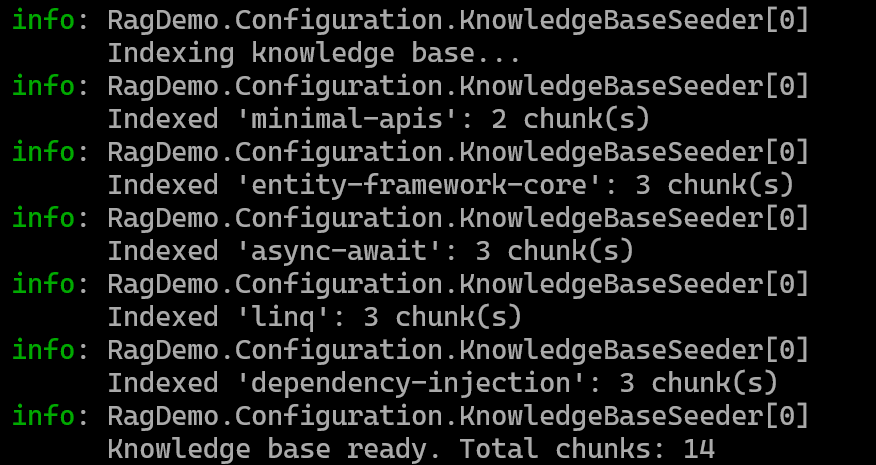
Once it starts, we can send a request to the endpoint. For that, I created some requests in the RagDemo.http file:
@RagDemo_HostAddress = http://localhost:5018

### Ask a question (RAG)
POST {{RagDemo_HostAddress}}/api/rag/ask
Content-Type: application/json

{
  "question": "What is the difference between Transient, Scoped, and Singleton?",
  "topK": 3
}

### Ask about async/await
POST {{RagDemo_HostAddress}}/api/rag/ask
Content-Type: application/json

{
  "question": "What are common mistakes with async and await?",
  "topK": 3
}

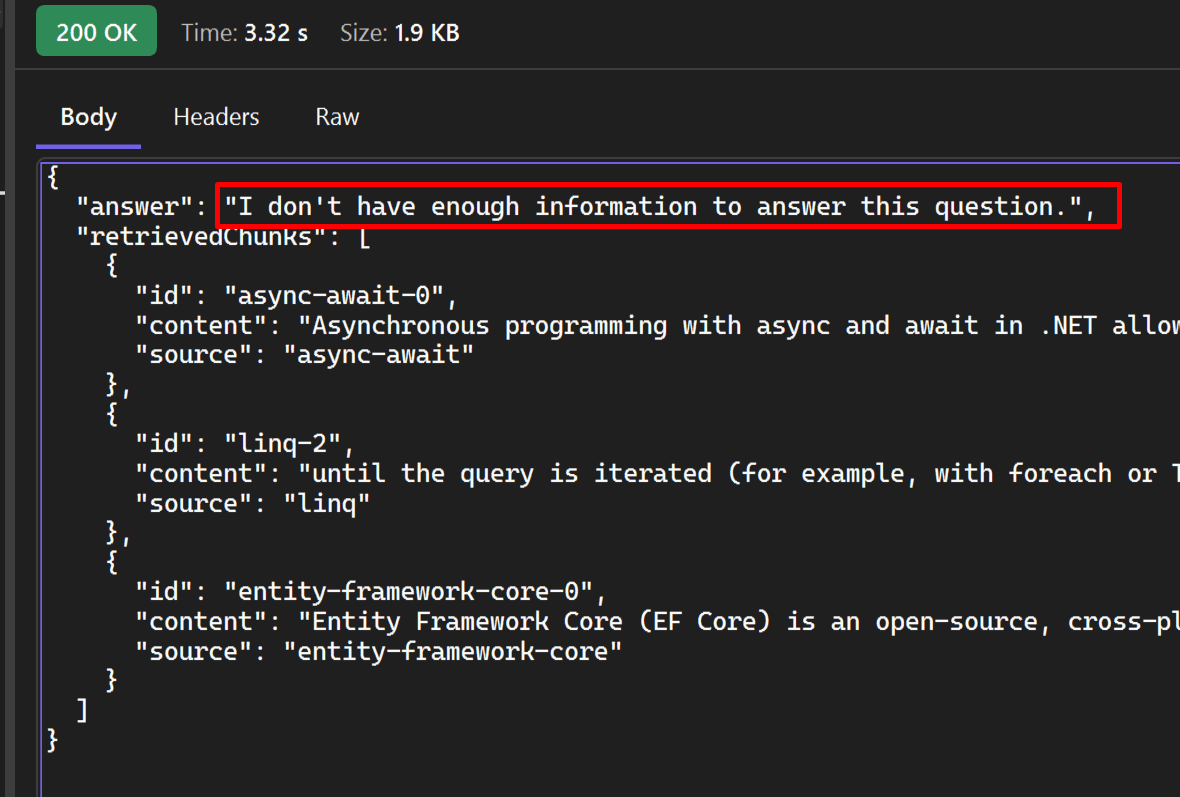
### Out-of-scope question
POST {{RagDemo_HostAddress}}/api/rag/ask
Content-Type: application/json

{
  "question": "What is the capital of the Netherlands?",
  "topK": 3
}

### Empty question (returns 400 Bad Request)
POST {{RagDemo_HostAddress}}/api/rag/ask
Content-Type: application/json

{
  "question": " ",
  "topK": 3
}
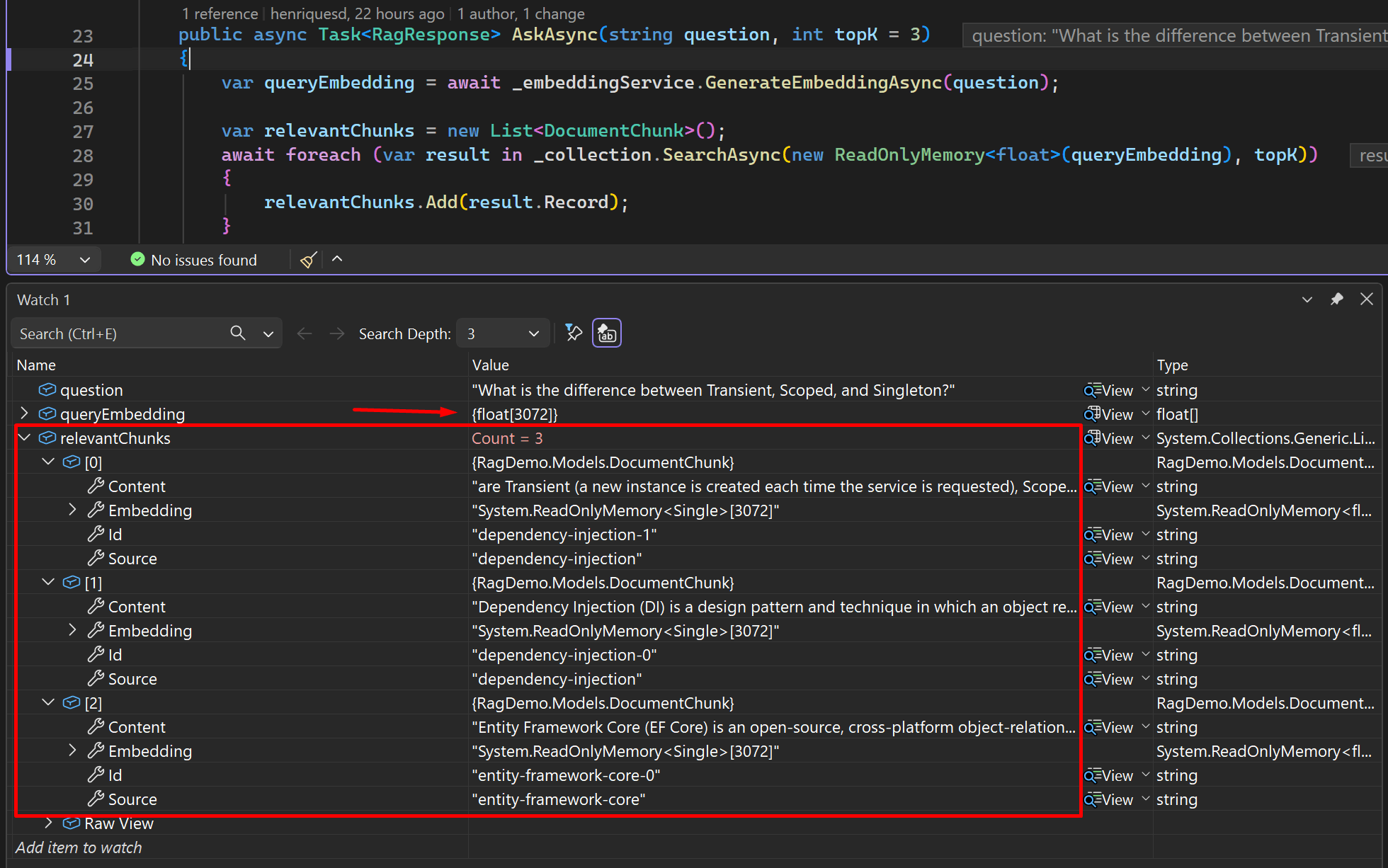
I sent the first request with the question What is the difference between Transient, Scoped, and Singleton?, and I added a breakpoint in the RagService to show what is happening during execution time. As you can see, the question was embedded and the relevant chunks were returned:
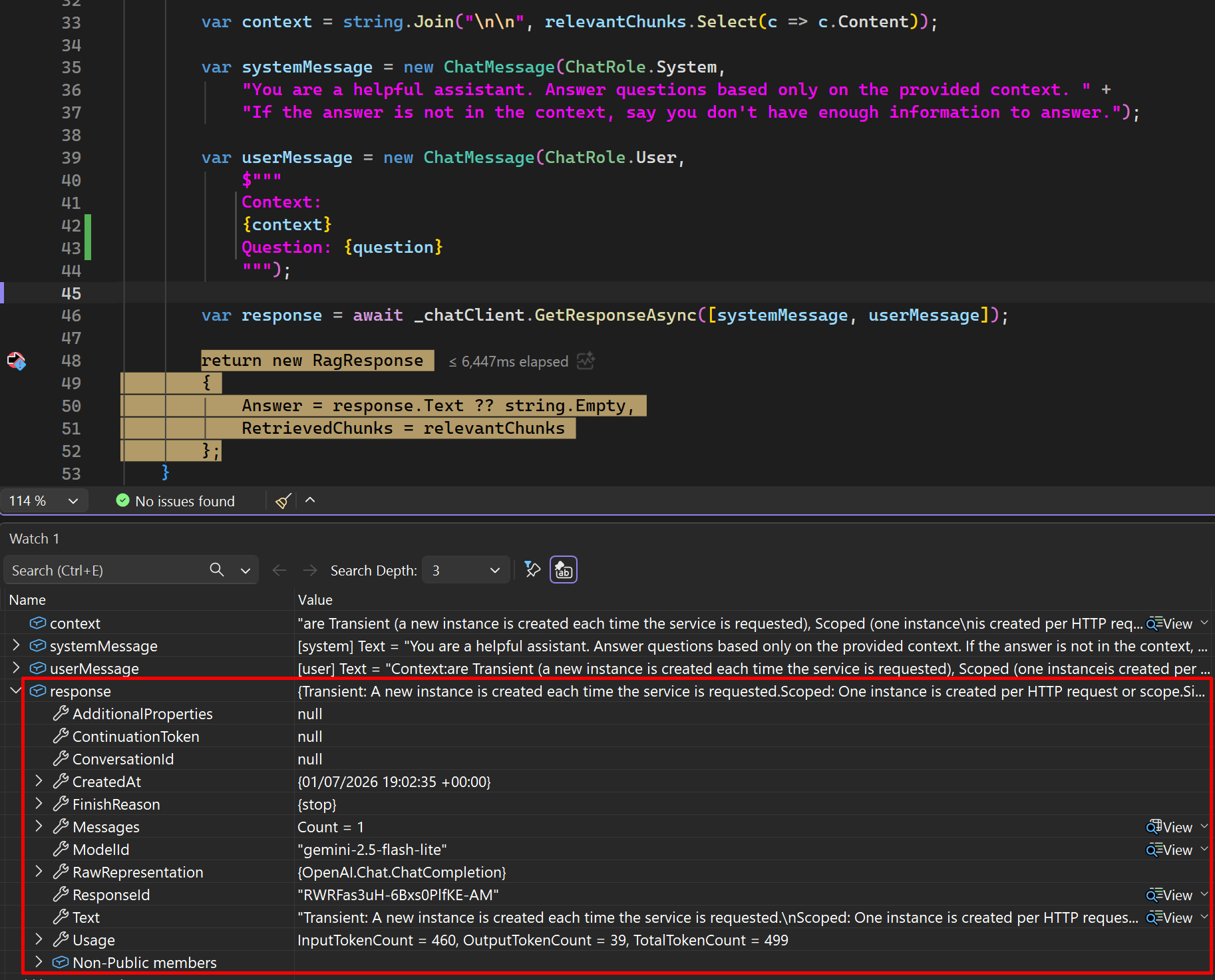
After that, a request was sent to the OpenAI Chat Client, and the response with the answer was returned:
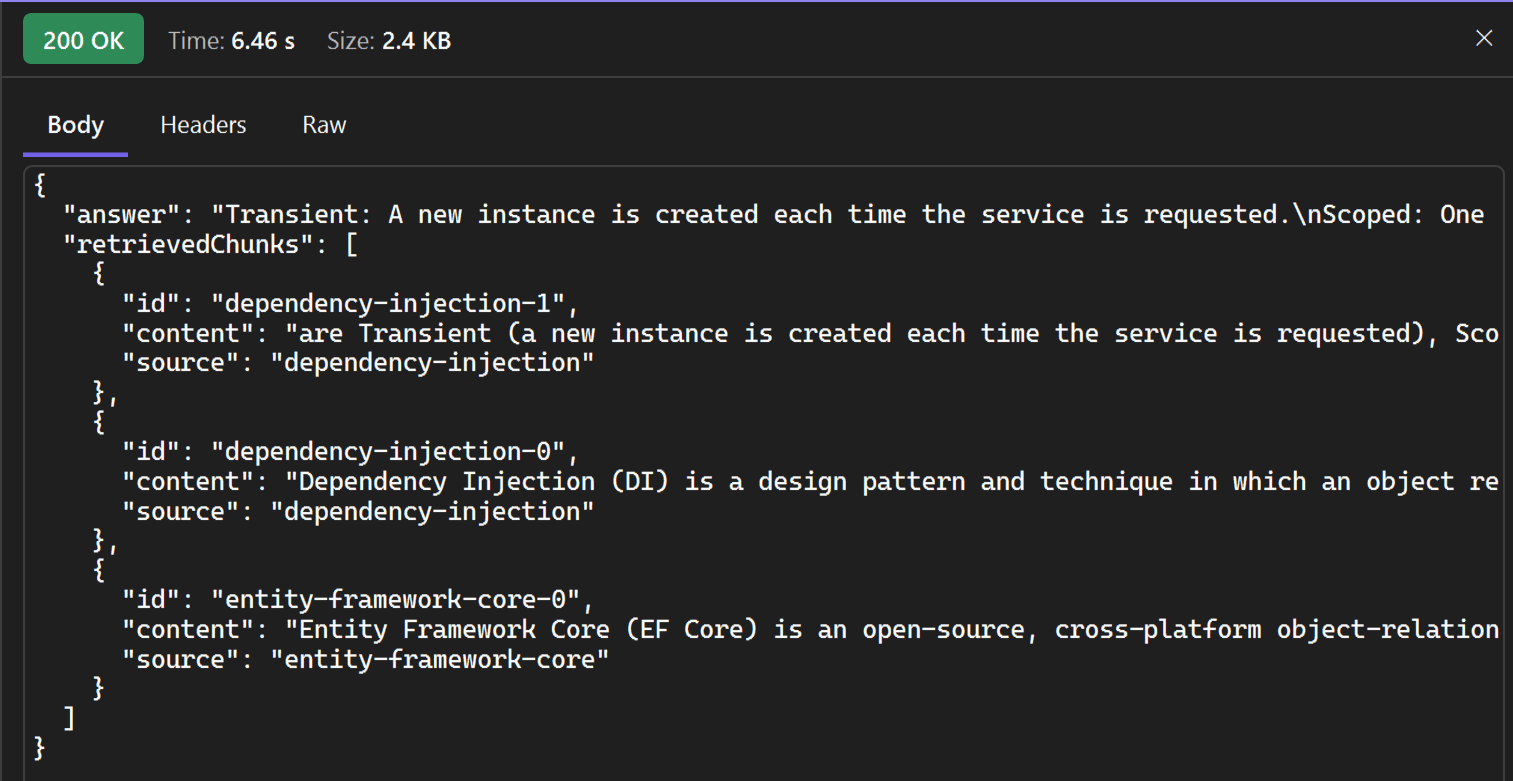
The answer to the question and the relevant chunks are returned:
For out-of-scope questions, the question will not be answered:
Conclusion
Retrieval-Augmented Generation (RAG) is a technique for building AI applications in which relevant information is retrieved from an external knowledge base and provided to an LLM as context. This enables the model to generate more accurate and grounded responses while helping reduce hallucinations.
RAG turns an LLM from a pure knowledge model into a knowledge model with a search system, making it behave more like an assistant that can “look things up” before answering, allowing the LLM to access your data at query time and use this data to generate a grounded response.
As presented in this article, implementing RAG in a .NET application is pretty straightforward, by using Microsoft packages such as Microsoft.Extensions.AI.OpenAI and Microsoft.SemanticKernel, you have a rich set of abstractions and APIs out of the box, making it easier to build RAG applications.
This is the link to the project on GitHub: https://github.com/henriquesd/RagDemo
If you like this demo, I kindly ask you to give a ⭐ in the repository.
Thanks for reading!
References